Gemma 4 for AI Video: How Google's Open Source Model Changes Video Creation
Google Gemma 4 is an open Apache 2.0 model family with native video understanding. Learn about its four model sizes, AIME and LiveCodeBench benchmarks, and how it fits AI video workflows.

Google DeepMind just open-sourced its most capable small model family yet. Gemma 4 - four models, all open-weight, all Apache 2.0 - launched on April 2, 2026. And if you're in the AI video space, you need to pay attention.
This isn't just another model release. A 31-billion-parameter model is outperforming competitors 20x its size. A 4B model runs on your phone. And every single one of them understands video natively.
Here's what that means for AI video creators, and how to put Gemma 4 to work in your workflow today.
What Is Gemma 4? (And Why Video Creators Should Care)
Gemma 4 is Google DeepMind's latest open-source model family, built on the same research foundation as its Gemini series. It ships in four sizes:
- E2B (2B effective parameters) - runs on phones, Raspberry Pi, and edge devices
- E4B (4B effective parameters) - the sweet spot for local deployment
- 26B MoE - 26 billion parameters, but only activates 3.8B at inference time. Fast.
- 31B Dense - the flagship. Single-GPU deployable, benchmark-crushing
The numbers are hard to ignore. On Arena AI's text leaderboard, the 31B Dense ranks #3 among all open-source models with an Elo of 1452 (as of April 2026), and the 26B MoE secures #6. Both outperform models 20x their size. On the AIME 2026 math benchmark, scores jumped from 20.8% (Gemma 3) to 89.2% (Gemma 4). On LiveCodeBench v6, competitive coding went from 29.1% to 80.0%.
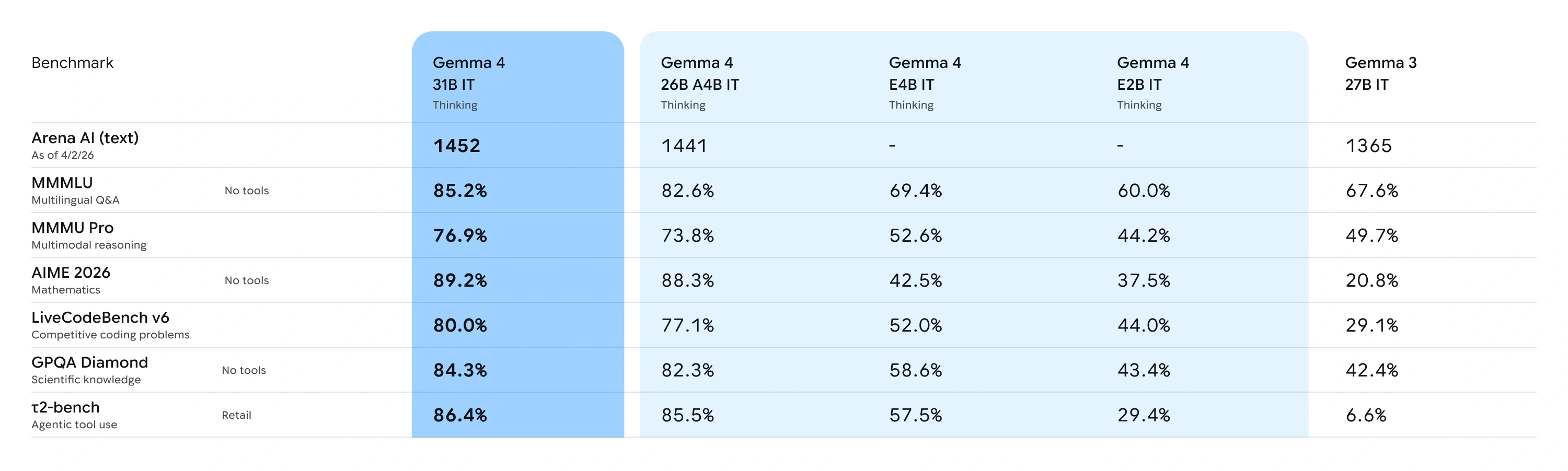
Source: Google DeepMind
But the real story for video creators? Every Gemma 4 model processes video natively. Not as an afterthought. Not through a plugin. Built in from day one.
Gemma 4's Video Understanding Capabilities
Let's break down what "video understanding" actually means in practice.
Frame-by-Frame Analysis
Gemma 4 processes video as sequences of frames, extracting semantic meaning from each one. Feed it a 30-second product demo, and it can tell you:
- What's happening in each scene
- What text appears on screen
- What the visual style and color palette look like
- What transitions are being used
This matters because understanding existing videos is the first step to creating better ones.
Audio + Visual (E2B and E4B)
The smaller models go further - they process audio alongside video. The E2B and E4B models feature native audio input for speech recognition and understanding. Give E4B a concert clip, and it can analyze the visual staging while also processing the audio track for speech or musical content.
GUI Element Detection
Here's a surprising one: all four models support GUI element detection - given a screenshot, they can identify UI elements and return bounding box coordinates in JSON format. Ask "Where is the play button?" and Gemma 4 can locate it - useful for building automated video editing workflows.
For video tool builders, this opens the door to automated UI testing and interaction with video editing interfaces.
Native Function Calling
This is the game-changer. Gemma 4 doesn't just understand video - it can take action based on what it sees.
Function calling is baked into the training process, not bolted on through prompt engineering. It handles multi-turn, multi-tool agent workflows reliably. Combined with structured JSON output and native system instructions, you can build autonomous agents that interact with tools and APIs to execute complex workflows.
Building an AI Video Workflow with Gemma 4
Here's where theory meets practice. Three real workflows you can build today:
Workflow 1: Competitive Video Analysis into Better Prompts
The problem: You want to create AI videos that match a specific style, but writing the right prompt is hard.
The solution:
- Feed competitor videos into Gemma 4
- Let it analyze visual style, pacing, color grading, camera movement
- Use the analysis to craft precise prompts
- Pass those prompts to a text-to-video tool to produce your content
Instead of guessing "cinematic, warm tones, slow zoom," you get a structured breakdown: "Medium shot, 24fps, warm color temperature, slow dolly-in over 4 seconds, shallow depth of field with bokeh highlights."
That level of specificity produces dramatically better results when fed to models like Kling 3.0, Sora 2, or Veo 3.1.
Workflow 2: Agent-Driven Video Pipeline
The problem: You're producing dozens of videos per week and the manual work is killing you.
The solution: Use Gemma 4's native function calling to build an automated pipeline:
- Input: Text brief or reference image
- Gemma 4 Agent: Analyzes the brief, selects the best AI video model for the job, generates an optimized prompt
- Video Generation API: Sends the prompt to Veevid's multi-model platform - which supports Kling 3.0, Sora 2, Veo 3.1, Wan 2.6, and more
- Quality Check: Gemma 4 reviews the output, flags issues, suggests regeneration if needed
The entire loop can run locally with the 26B MoE model (only 3.8B active parameters = fast inference), while the actual video generation happens in the cloud.
Workflow 3: Offline Batch Processing
The problem: You have hundreds of product images that need video versions, and API costs add up.
The solution:
- Deploy Gemma 4 E4B locally (runs on a laptop)
- Batch-process all images: analyze content, generate optimized prompts, categorize by style
- Export a CSV of prompts ranked by expected quality
- Send the top prompts to your image-to-video tool in a single batch
The local AI handles the thinking. The cloud handles the rendering. You pay for generation only when the prompt is already optimized.
Gemma 4 vs Other Open-Source Models for Video Tasks
How does Gemma 4 stack up against the competition for video-related work?
| Feature | Gemma 4 31B | Llama 4 Scout | Qwen 2.5-VL 72B |
|---|---|---|---|
| Video Understanding | Native | Limited | Native |
| Audio Input | E2B/E4B only | No | No |
| Function Calling | Training-native | Prompt-based | Prompt-based |
| Min. Hardware | Single 80GB GPU | Multi-GPU | Multi-GPU |
| License | Apache 2.0 | Llama License | Apache 2.0 |
| Context Window | Up to 256K | 10M (MoE) | 128K |
| Local Deployment | Quantized on consumer GPU | Heavy | Heavy |
The key differentiator: Gemma 4 gives you frontier-class multimodal understanding at a size that actually fits on hardware you can afford.
But here's the important distinction: these models understand and analyze video - they don't generate it. For actual video creation, you need a dedicated AI video generator that connects to state-of-the-art generation models. Tools like Veevid bridge that gap by giving you access to Kling 3.0, Sora 2, Veo 3.1, LTX 2.3, and 10+ other models through a single interface.
The winning combination: Gemma 4 for intelligence, a dedicated generator for creation.
How to Run Gemma 4 Locally (Quick Start)
Getting Gemma 4 running takes less than 5 minutes. Here are three paths:
Option 1: Ollama (Easiest)
# Install Ollama
curl -fsSL https://ollama.com/install.sh | sh

# Pull Gemma 4 (quantized for consumer hardware)
ollama pull gemma4:31b

# Or the lightweight version
ollama pull gemma4:e4b

# Start chatting
ollama run gemma4:31b
Option 2: LM Studio (GUI)
- Download LM Studio
- Search for "Gemma 4"
- Pick your size (E4B for laptops, 31B for workstations)
- Click Download, then Start
Option 3: vLLM (Production)
pip install vllm

vllm serve google/gemma-4-31b-it \
  --max-model-len 32768 \
  --tensor-parallel-size 1
Hardware requirements:
- E2B / E4B: Phones, Raspberry Pi, any laptop (128K context)
- 26B MoE: 16GB+ VRAM quantized (256K context)
- 31B Dense: Single 80GB H100, or quantized on 24GB consumer GPU (256K context)
The Future of Open Source AI in Video Creation
Gemma 4's release marks a clear inflection point. Three things are converging:
1. Open-source models now rival closed ones. A 31B model matching 600B+ competitors means you don't need to pay per-token for intelligence anymore. Run it locally, own your data, iterate faster.
2. Apache 2.0 removes all friction. No custom license reviews. No attribution clauses to navigate. Fork it, fine-tune it, ship it. Over 400 million Gemma downloads and 100,000+ community variants prove the demand is real.
3. The "understand + generate" split is the new paradigm. Open-source models handle understanding, analysis, and orchestration locally. Cloud APIs handle the computationally intensive generation. You get the best of both worlds: privacy and power.
For AI video creators, this means your workflow is about to get dramatically more sophisticated - and dramatically cheaper.
Start Creating
The models are live. The license is open. The only question is what you'll build with them.
If you're ready to put Gemma 4's video intelligence to work, pair it with a multi-model AI video generator to complete the pipeline. Veevid supports Kling 3.0, Sora 2, Veo 3.1, and more from a single platform - start creating for free.
Gemma 4 understands. You create.