AI Video Resizer
Change your video's aspect ratio without cropping. AI expands the scene around your subject to fill 9:16, 16:9, 1:1 and more - ready for TikTok, YouTube Shorts, Instagram Reels and beyond. Add a prompt to guide how the new area is filled. Videos up to 30 seconds.
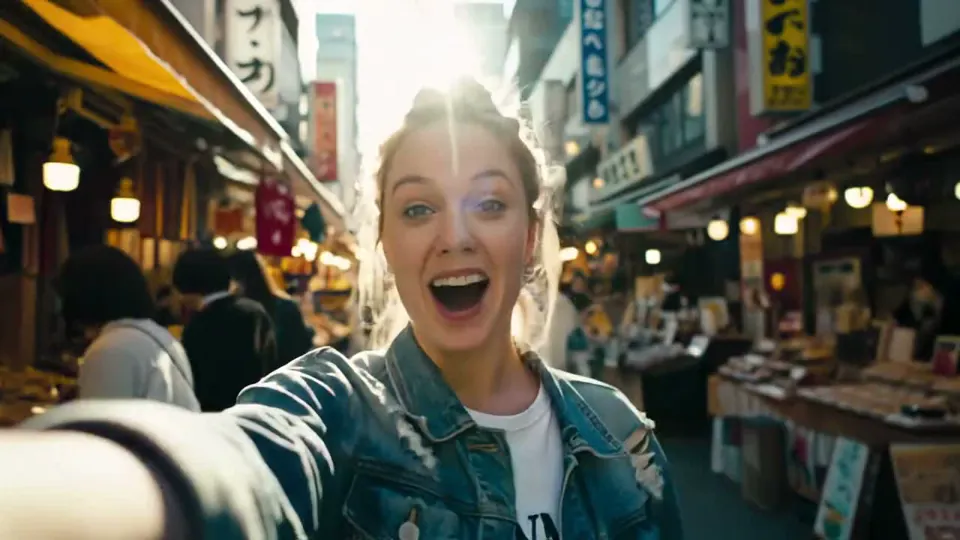
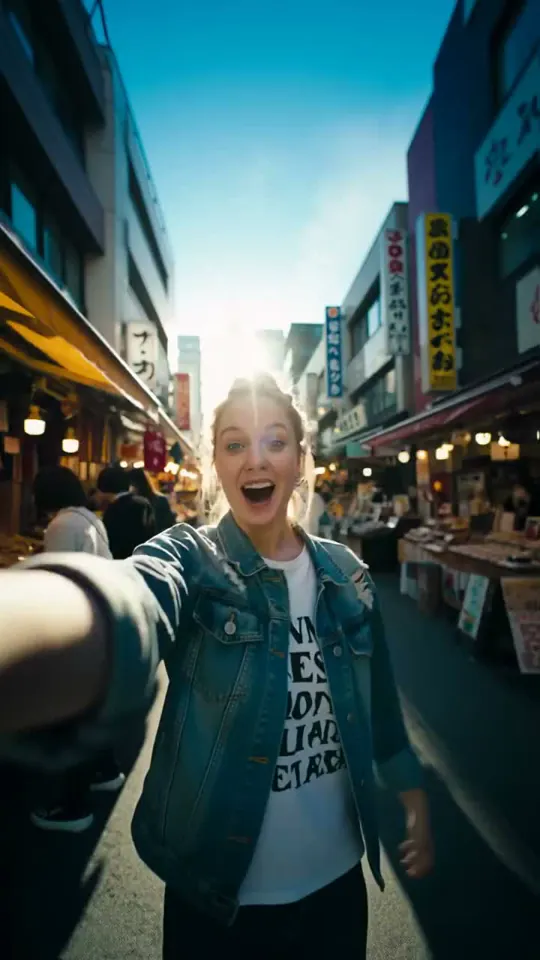
AI Video Resizer in Action
Watch how AI expands a landscape clip into a vertical 9:16 video - no cropping, no black bars.
How to Use Our AI Video Resizer
Resize and reframe your video to any aspect ratio in 3 simple steps
Upload Your Video
Drop your video into the resizer or paste a URL. MP4, MOV and WebM files up to 30 seconds and 100MB are supported.
Choose Target Aspect Ratio
Select from 7 aspect ratios - 16:9, 9:16, 1:1, 4:3, 3:4, 21:9, and 9:21 - optimized for YouTube, TikTok, Instagram, and more. Optionally add a custom prompt to guide the AI on how to reframe your scene.
Resize & Download
The AI video resizer intelligently reframes your video, expanding the scene to fit the new ratio. Preview the result and download it as an MP4.
Resize Videos for TikTok, Instagram, YouTube and More
Pick the aspect ratio for where your video will be posted. The AI fills the new space instead of cropping, so nothing important gets cut off.
TikTok
9:16Turn landscape footage into a full-screen vertical video instead of posting it with black bars above and below.
YouTube Shorts
9:16Repurpose moments from your long-form 16:9 videos as Shorts without cutting people or products out of the frame.
Instagram Reels & Stories
9:16Resize videos for Instagram without cropping. The scene is extended to fill the whole phone screen, edge to edge.
YouTube & Websites
16:9Convert vertical phone clips to widescreen for YouTube videos, landing pages and presentations - no blurred side bars.
Instagram & Facebook Feed
1:1 / 3:4Square 1:1 works for feed posts on most social platforms, and 3:4 matches the Instagram profile grid.
Ads for Every Placement
9:16 / 1:1 / 16:9Ad platforms ask for vertical, square and landscape versions. Create all three from one video instead of reshooting.
Why Choose Our AI Video Resizer
Resize videos smarter - AI-powered reframing that adapts your content without compromise
Keep Your Subject in Focus
AI intelligently detects and preserves your main subject while expanding the scene around it - no awkward cropping or lost details.
7 Aspect Ratios, Every Platform
Resize to 16:9, 9:16, 1:1, 4:3, 3:4, 21:9, and 9:21. One video, perfectly adapted for YouTube, TikTok, Instagram Reels, and more.
No Black Bars, No Watermark
Instead of padding your video with black or blurred bars, the AI generates matching scenery for the new area. Results download as clean 720p MP4s without a watermark.
Custom Prompt Control
Guide the AI with your own prompts - describe how you want the scene expanded and the AI follows your creative direction.
Frequently Asked Questions About AI Video Resizer
Everything you need to know about resizing and reframing videos with AI
Traditional resizing simply stretches or crops your video, which often cuts out important content. Our AI video resizer analyzes each frame, keeps your main subject in place, and expands the scene around it (also called video outpainting) to fill the new aspect ratio - keeping everything in frame without distortion.
Upload your 16:9 landscape video, choose 9:16 as the target aspect ratio and start resizing. Instead of cutting off the sides, the AI extends the scene above and below your footage, so the whole original shot stays visible in the new vertical video. The same works in reverse - pick 16:9 to turn a vertical clip into a landscape one.
TikTok, Instagram Reels, Instagram Stories and YouTube Shorts all use vertical 9:16. Regular YouTube videos use 16:9. For feed posts, 1:1 square works on most platforms, and 3:4 matches the Instagram profile grid. Our resizer outputs 9:16 videos at 720x1280 and 16:9 videos at 1280x720.
Our AI video resizer supports 7 aspect ratios: 1:1 (Square), 16:9 (YouTube/Landscape), 9:16 (TikTok/Reels/Shorts/Portrait), 4:3 (Standard), 3:4 (Portrait), 21:9 (Ultra-wide), and 9:21 (Ultra-tall). Each is optimized for different social media platforms.
All resized videos are output at 720p (HD) resolution, whatever the resolution of your input video. Because the AI expands the scene rather than stretching pixels, your footage keeps its original proportions in the new aspect ratio.
Currently, the video resizer supports videos up to 30 seconds in length. This covers most social media content needs including TikTok, Instagram Reels, and YouTube Shorts.
You can upload MP4, MOV and WebM files up to 100MB. If your browser can't play a file, convert it to MP4 first. You can also paste a direct video URL instead of uploading a file.
Yes! Our video resizer supports custom prompts. You can describe how you want the AI to expand and reframe your scene, giving you creative control over the final result beyond just choosing an aspect ratio.
Resizing costs 12 credits per second of video, so a 10-second clip costs 120 credits. The exact cost is shown before you start, based on your video's length. Credits come with a subscription or a one-time credit pack.
Ready to Resize Your Video?
Transform your video to any aspect ratio with AI-powered reframing that keeps your subject in focus - no cropping, no black bars.