Nano Banana 2.1 vs 2 vs Pro: Which Google Image Model Should You Use?
Nano Banana 2.1 vs 2 vs Pro, tested with the same prompts on text, faces, products and busy scenes. See which Google image model to use for speed, cost and 4K.

Google now has three Nano Banana image models worth choosing between: Nano Banana 2.1, released in October 2026, Nano Banana 2 (Gemini 3.1 Flash Image), and Nano Banana Pro. They overlap a lot, so the real question is which one fits the job in front of you.
We ran the same four prompts through all three - a text-heavy poster, the same face in a new scene, a product shot and a crowded night market - and put the results side by side below. After that you'll find a spec comparison, a scenario-by-scenario recommendation, and our full guide to Nano Banana 2's features.
Quick answer: For everyday work, start with Nano Banana 2.1. It's the newest of the three, runs at about the same speed as Nano Banana 2, and currently costs less per image on Veevid than either 2 or Pro. Keep Nano Banana Pro for complex, multi-subject scenes where composition and camera direction matter more than speed and cost.
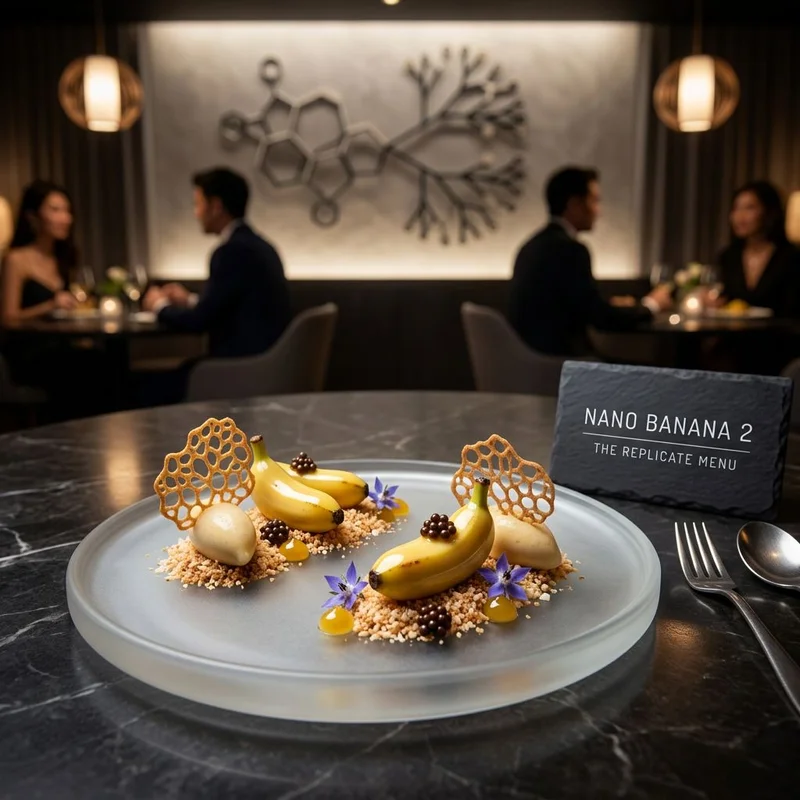
What Is Nano Banana 2.1?
Nano Banana 2.1 is Google's image generation and editing model released in October 2026. It's an update to Nano Banana 2 (Gemini 3.1 Flash Image) rather than a new model family. Google says it improves visual quality, prompt following, character consistency over several turns, and text rendering, while keeping Flash-level speed.
What that means in practice:
- Cleaner text in images. Posters, packaging, menus and infographics come out with the exact words you asked for, including small print.
- Stronger visual design. Layouts, type and color look art-directed rather than generic.
- The same person across scenes. Upload one portrait and place the same person in new settings and outfits.
- Multiple reference images. Combine people, products and places from several uploads in one picture, and refer to them by upload order in the prompt (image 1, image 2 and so on).
- 1K to 4K, 14 aspect ratios. From 8:1 banners to 1:8 strips, plus 16:9, 9:16, 4:5 and 1:1. Edits can also keep the shape of your photo with Auto.
Every sample on the Nano Banana 2.1 page was generated with the prompt shown next to it, so it's a good place to see more of what the model can do.
Nano Banana 2.1 vs 2 vs Pro: Same-Prompt Tests
How we tested: each model got the identical prompt, aspect ratio, resolution and seed. The first three tests ran at 1K and the crowded scene at 2K. Nothing was retouched. We generated one image per model, with one exception noted in Test 2.
Test 1: Text-Heavy Poster
A vintage travel poster for a small island ferry line. Big bold headline at the top reads "SALT & SUN FERRY CO." Below it, a teal ferry crossing a sparkling bay toward a lighthouse. A timetable panel at the bottom lists four lines: "Harbor Point - 08:15", "Gull Rock - 09:40", "Lantern Bay - 11:05", "Last return - 18:30". Small footer text reads "Tickets at Pier 3". Flat screen-print style, cream, teal and coral palette, crisp typography.
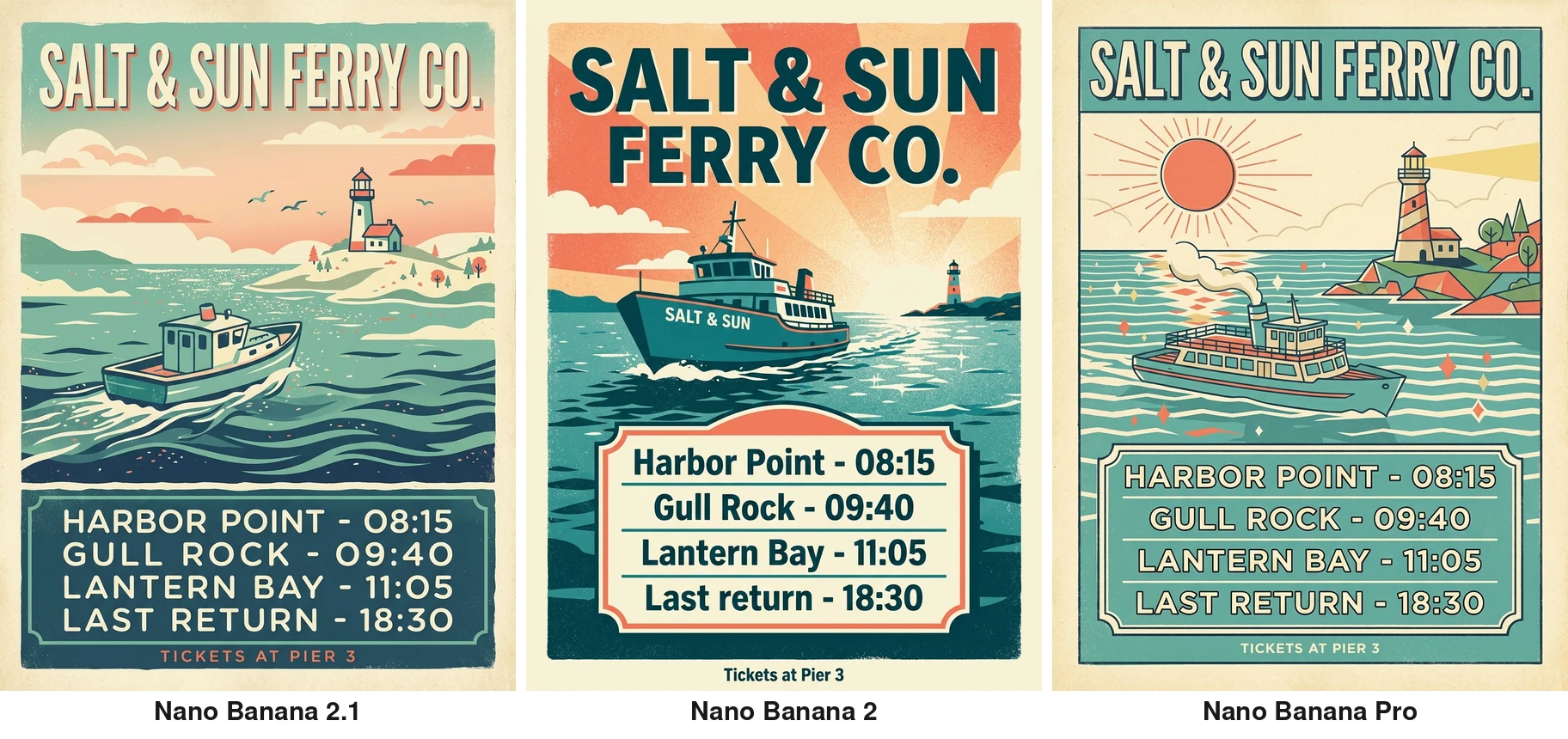
All three models spelled every word and every departure time correctly, so at this level text accuracy is a tie. The differences are in design. Nano Banana 2.1 and Pro both kept the flat screen-print look and set the timetable in clean capitals, though 2.1 drew a small boat rather than a passenger ferry. Nano Banana 2 went for a bolder sunburst layout and kept the exact mixed-case wording from the prompt, though it also painted "SALT & SUN" on the ferry's hull, which the prompt didn't ask for.
Test 2: The Same Person in a New Scene
This one is image to image. We uploaded a portrait of an original character (not a real person) and asked each model to place her in a new scene:
The same woman sitting by a rainy cafe window, writing in a leather notebook, wearing a charcoal wool coat, a cup of coffee on the table, candid photo. Keep her face, curly red hair and freckles unchanged.
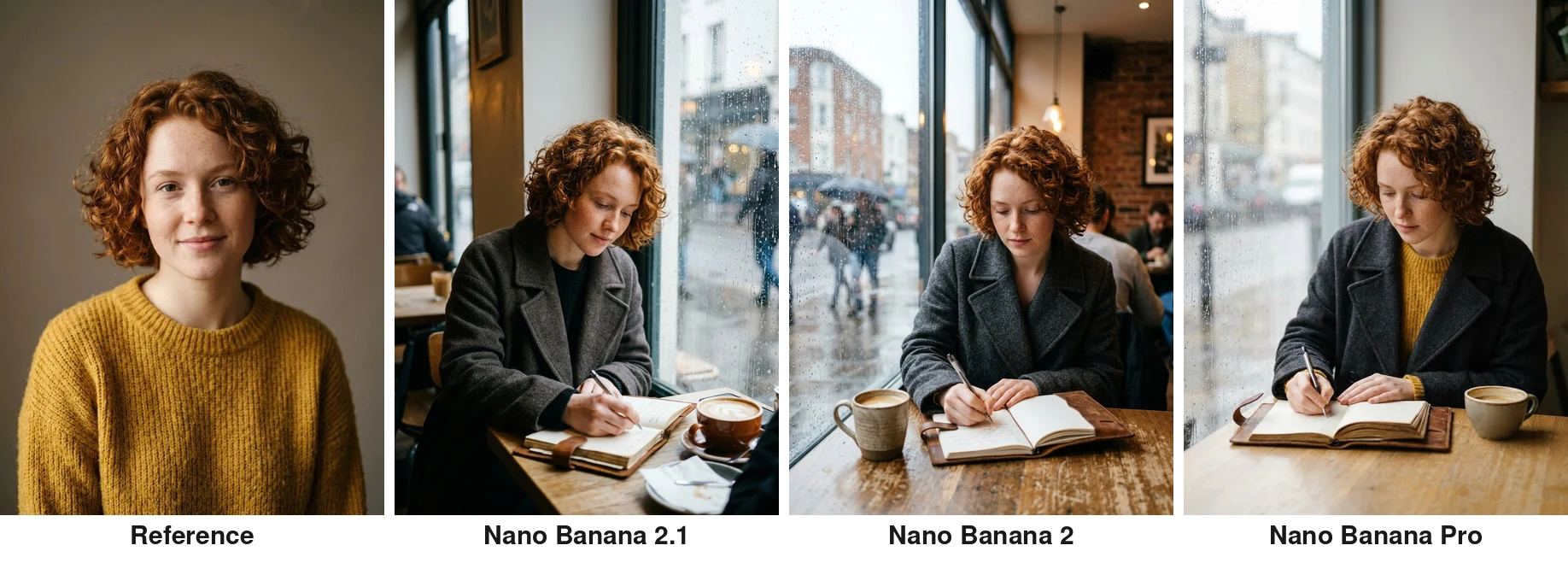
All three kept her face, curls and freckles recognizably the same. Pro went one step further and kept her mustard sweater under the new coat, a nice bit of continuity nobody asked for. Nano Banana 2.1 needed a second seed here: on the first try she was writing on the table next to a closed notebook. The second try, with a different seed and shown above, got it right. Nano Banana 2 and Pro got it on the first try.
Test 3: Product Photo
A premium studio product photo of a compact matte black wireless speaker with a woven fabric front and a small embossed logo that reads "ORBIT MINI", standing on a slab of wet dark slate with water droplets, a single sprig of eucalyptus beside it, dramatic soft side light and a subtle reflection, shallow depth of field, commercial catalog quality.
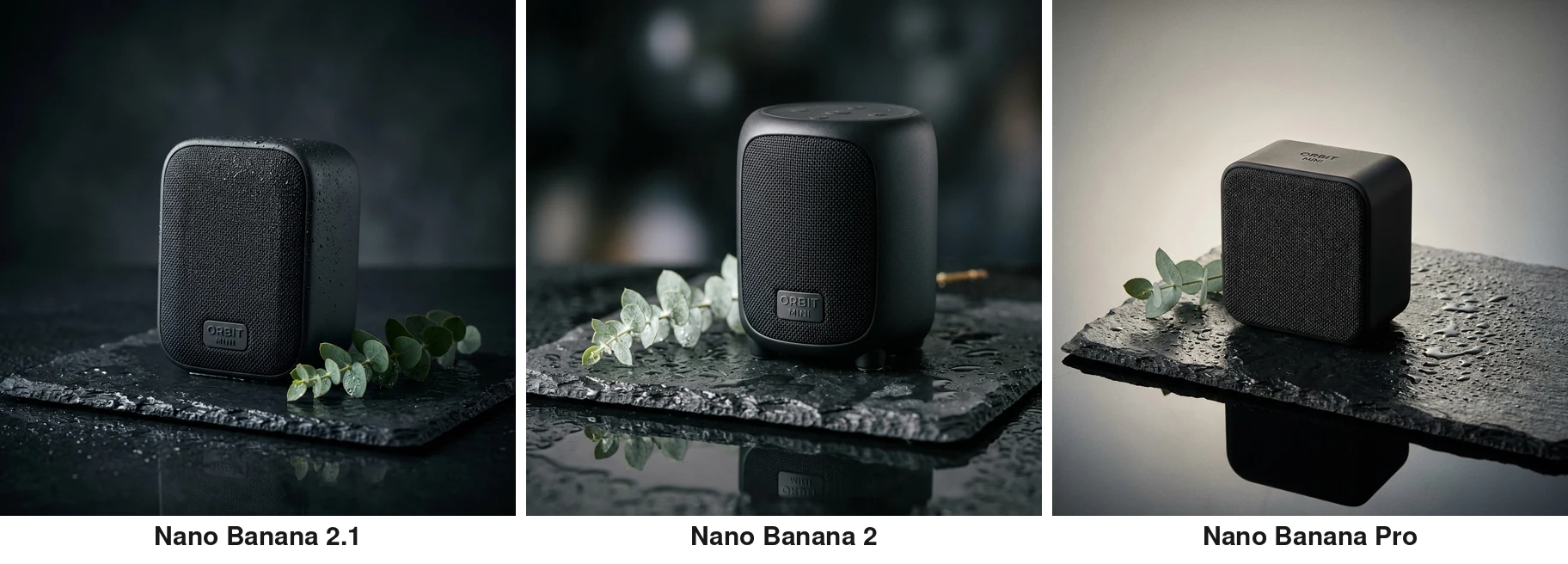
Nano Banana 2.1 gave the cleanest packshot: a crisp embossed badge that reads "ORBIT MINI", droplets on the speaker itself and a convincing wet slate. Nano Banana 2's badge is just as readable, but it added a stray brass rod behind the speaker. Pro chose a lighter, more editorial set with a strong reflection and put a small "ORBIT MINI" engraving on the top instead of a badge on the front, where it's harder to read.
Test 4: Crowded Scene at 2K
A busy night market street in light rain, seen from slightly above. On the left, a noodle stall with a red neon sign that reads "LUCKY 8 NOODLES" and a cook tossing noodles in a flaming wok. In the center, a little girl in a yellow raincoat holding a goldfish in a plastic bag. On the right, a fruit stand where a ginger cat sleeps on a crate of oranges. A cyclist with a blue umbrella rides through the middle. Strings of warm lights overhead, steam rising, reflections in puddles. Cinematic, photorealistic, rich detail.
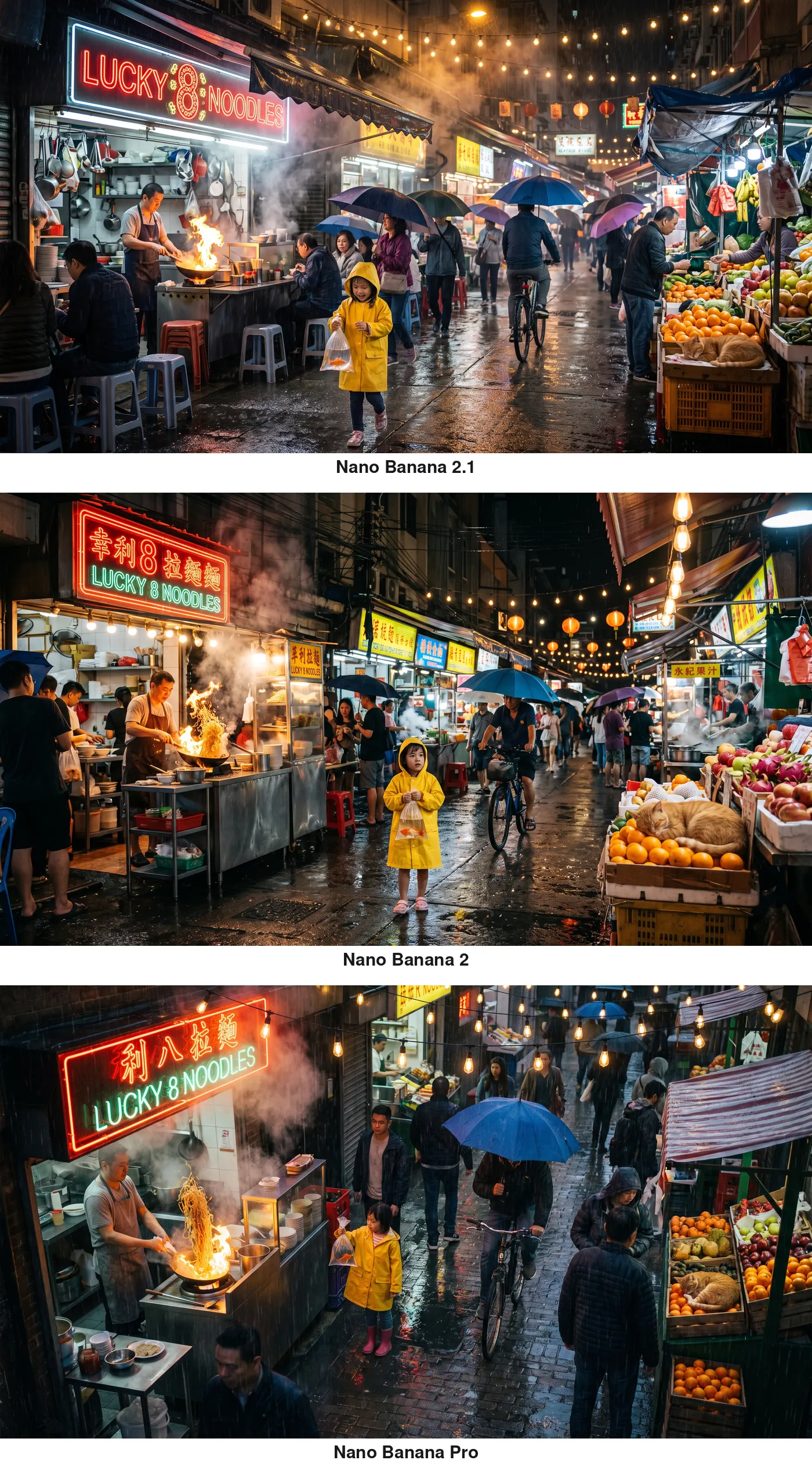
All three placed every element we asked for: the neon noodle sign, the cook with a flaming wok, the girl in the yellow raincoat with her goldfish, the cat asleep on the oranges, the cyclist, the lights and the puddles. Two differences stood out. Only Pro clearly followed "seen from slightly above" - 2.1 and 2 stayed close to eye level. And only 2.1 rendered the noodle sign exactly as written; Nano Banana 2 and Pro both added Chinese characters to it that weren't in the prompt.
What the Tests Tell Us
- Text: All three spelled short headlines and lists correctly. Nano Banana 2 painted a name on the ferry's hull, and both 2 and Pro added Chinese characters to the noodle sign, while 2.1 didn't add any words to the poster, the speaker badge or the noodle sign.
- Faces: All three hold a person's identity well from a single reference. Pro carried over the most extra detail.
- Complex scenes: Pro followed camera direction best, which matters when composition has to be exactly right.
- Speed: In these runs, 2.1 and 2 finished in about the same time, while Pro took noticeably longer for the same prompt.
Nano Banana 2.1 vs 2 vs Pro vs Nano Banana: Specs Compared
| Feature | Nano Banana 2.1 | Nano Banana 2 | Nano Banana Pro | Nano Banana (Original) |
|---|---|---|---|---|
| Generation Speed | About the same as Nano Banana 2 | A few seconds | 8-12 seconds | 3-5 seconds |
| Image Quality | Improved over Nano Banana 2 | Pro-level | Highest | Flash-level |
| Text Rendering | Cleaner, including small print | Accurate, multi-language | Accurate | Basic |
| Subject Consistency | Same person across scenes and turns | 5 characters, 14 objects | 5 characters, 14 objects | Up to 3 references |
| Natural Language Editing | Yes | Yes | Yes | Yes |
| Max Resolution | Up to 4K (1K, 2K, 4K) | Up to 4K | Up to 4K | Standard |
| Web Search Grounding | Not offered on Veevid | Yes | Limited | No |
| Cost per Image on Veevid | Lowest of 2.1, 2 and Pro | More than 2.1, same as Pro at 2K | Highest at 1K and 4K, same as 2 at 2K | Low, single resolution |
Credits change from time to time, so we don't list them here. See the pricing page for plans; the generator shows the exact cost for your model and resolution before you click Generate.
Which Nano Banana Should You Use?
- Everyday images, speed and volume: Nano Banana 2.1. It's as fast as Nano Banana 2, costs less per image, and handles social posts, thumbnails, ad creatives and quick iterations well.
- Posters, packaging, menus and labels: Nano Banana 2.1. In our tests it didn't add unrequested words to the poster, the product badge or the noodle sign.
- The same character across many images: Nano Banana 2.1 or Pro. Both hold a face well. 2.1 is the cheaper way to make lots of variations; Pro carries over more small details like clothing.
- 4K hero images and complex scenes: Nano Banana Pro. For crowded, multi-subject scenes or a specific camera angle, Pro followed directions best. It's slower and usually costs more, so save it for final assets. If budget matters, 2.1 also goes up to 4K.
- Already happy with Nano Banana 2? It's still a solid model. Re-run your best prompts on 2.1 and keep whichever result you prefer.
On Veevid you can switch between all three in the same generator: pick Nano Banana 2.1 or Nano Banana 2 from the model list, or choose Google Nano Banana and switch its version to Nano Banana Pro.
What Is Nano Banana 2?
Nano Banana 2 is the Google DeepMind image model that Nano Banana 2.1 builds on. Its full technical name is Gemini 3.1 Flash Image, and it sits on top of the Gemini 3.1 Flash reasoning backbone.
The short version: it takes the advanced world knowledge, quality, and reasoning capabilities of Nano Banana Pro (the previous top-tier model) and runs them on the Flash architecture, which is optimized for speed and throughput. The result is a model that generates images up to 4x faster than previous generation models while matching or approaching Pro quality across most use cases.
When it launched, Nano Banana 2 became the default image model inside Gemini, replacing the previous Flash image generator. It's available through the Gemini API, Google AI Studio, and Vertex AI for enterprise deployment. For a full feature overview, check out the Nano Banana 2 page.
Key Features of Nano Banana 2
1. Flash Speed with Pro Quality
Speed is the headline feature. Nano Banana 2 generates standard images in just a few seconds, with higher-resolution outputs typically completing in under 10 seconds. That's roughly 4x faster than Nano Banana Pro, at a lower cost per image on Veevid at 1K and 4K.
For creators who iterate rapidly on concepts, this means you can test dozens of ideas in the time it used to take to generate a handful.
2. Accurate Text Rendering
One of the biggest pain points in AI image generation has been text. Most models either garble letters, misspell words, or produce illegible typography. Nano Banana 2 fixes this.
The model renders accurate, legible text directly within generated images. It supports in-image localization with multiple languages, so you can generate marketing mockups, greeting cards, event posters, and branded materials with clean typography in English, Chinese, Japanese, Korean, Spanish, and more.
3. Subject Consistency
Keeping characters looking the same across multiple images has always been a challenge with AI generators. Nano Banana 2 handles this natively.
The model maintains character consistency for up to 5 characters and preserves fidelity of up to 14 objects within a single workflow. This makes it practical for storytelling, brand asset creation, and any project where visual coherence across multiple images matters.
4. Natural Language Image Editing
Nano Banana 2 isn't just a generator. It also supports natural language image editing. Upload an existing image and describe what you want changed in plain English:
- Blur the background
- Remove an object
- Change a pose
- Add color to a black and white photo
- Swap out a background
- Adjust lighting or mood
No complex editing tools needed. Just describe the change and let the model handle it.
5. Full Resolution Control
Nano Banana 2 supports resolutions from 512 pixels up to 4K, with native support for a wide range of aspect ratios including standard formats (1:1, 16:9, 4:3) and extended formats like 4:1, 1:4, 8:1, and 1:8.
The new 512px resolution tier is particularly useful for rapid-fire iterations and heavy-duty pipelines where speed matters more than final output size. When you need the full detail, scale up to 4K.
6. Web-Powered Intelligence
Unlike most image generators that rely solely on training data, Nano Banana 2 can tap into Gemini's real-world knowledge base and real-time web search to more accurately render specific subjects.
Ask it to generate a specific landmark, a current product, or a recent cultural reference, and it draws on live web information rather than just what it learned during training. This makes it particularly useful for:
- Educational content with accurate visual references
- Localized marketing materials
- Travel and tourism visuals
- Current event illustrations
Nano Banana 2 vs Midjourney vs DALL-E
How does Nano Banana 2 compare to other popular AI image generators?
| Capability | Nano Banana 2 | Midjourney V6 | DALL-E 3 |
|---|---|---|---|
| Text Rendering | Accurate, multi-language | Poor | Good |
| Photorealism | Excellent | Excellent (stylized) | Good |
| Speed | A few seconds | 30-60 seconds | 10-15 seconds |
| Max Resolution | 4K | 2K upscaled | 1024x1024 |
| Image Editing | Natural language | Limited | Basic |
| Subject Consistency | 5 characters | Via --sref flag | No native support |
| Web Grounding | Yes | No | No |
| API Access | Yes | No official API | Yes |
Nano Banana 2's advantages are clear in speed, text rendering, and API accessibility. Midjourney still leads in artistic stylization and community-driven prompt optimization. DALL-E 3 integrates tightly with ChatGPT but trails in resolution and editing capabilities.
How to Use Nano Banana 2 on Veevid
Getting started takes about 30 seconds:
Step 1: Choose Your Tool
Head to Text to Image to generate images from a text prompt, or Image to Image to transform and edit existing images. Nano Banana 2 will be pre-selected as your model.
Step 2: Write Your Prompt
Describe the image you want. Be specific about composition, lighting, style, and any text you want rendered in the image. For example:
A professional product photo of a coffee mug on a wooden table, morning sunlight streaming through a window, with "Good Morning" written on the mug in elegant script
Step 3: Configure Settings
Choose your aspect ratio and resolution. For quick iterations, start with lower resolutions. For final outputs, go up to 4K.
Step 4: Generate
Hit generate and get your result in seconds. Download, iterate, or use the natural language editor to make adjustments.
Best Use Cases for Nano Banana 2
Marketing and Advertising
Create ad creatives, social media visuals, and campaign assets with embedded text and consistent brand characters. The speed means you can A/B test visual concepts rapidly.
E-commerce Product Visuals
Generate product mockups, lifestyle shots, and promotional banners with accurate product names and pricing text rendered directly in the image.
Content Creation
Blog headers, YouTube thumbnails, social media posts, and newsletter visuals. The fast generation time fits into any content workflow without slowing you down.
Education and Infographics
Leverage web-grounded generation to create accurate educational visuals, diagrams, and infographics with up-to-date information.
Brand Asset Libraries
Use subject consistency to build entire character libraries and visual asset sets that maintain coherence across dozens of images.
Rapid Prototyping
Designers and product teams can quickly visualize concepts, UI mockups, and storyboards at a fraction of the cost and time of traditional methods.
Tips for Getting the Best Results
-
Be specific with prompts. Instead of "a dog," try "a golden retriever puppy sitting in a sunlit garden, shallow depth of field, warm afternoon light."
-
Use text rendering deliberately. When you want text in your image, put it in quotes within your prompt. Specify the font style (elegant, bold, handwritten) and placement.
-
Start at 512px for iterations. Use the lowest resolution to quickly find the right composition, then regenerate at 4K for the final output.
-
Leverage subject consistency. When creating a series of images with the same character, reference previous outputs to maintain visual coherence.
-
Try natural language editing. If a generated image is 90% right, don't regenerate. Instead, describe the specific change you want.
Pricing
Nano Banana 2.1, Nano Banana 2 and Nano Banana Pro are all available on Veevid with credit-based pricing. Every new account gets free credits to start creating immediately.
Credits per image depend on the model and the resolution. Right now Nano Banana 2.1 costs the least of the three at every resolution, and Pro costs the most at 1K and 4K (at 2K it matches Nano Banana 2). The generator shows the exact cost before you click Generate, and model details are on the Nano Banana 2.1 and Nano Banana 2 pages.
For higher volume usage, Veevid offers affordable credit packages and subscription plans that include access to all three Nano Banana models alongside other AI models for image and video generation.
All images you create through Veevid are yours to use for personal and commercial purposes without additional licensing fees.
Frequently Asked Questions
Which Nano Banana is the latest?
Nano Banana 2.1 is the latest, released in October 2026. It's an update to Nano Banana 2 that Google says improves visual quality, prompt following, character consistency and text rendering at the same Flash-level speed. Nano Banana Pro is still available as the slower, higher-end option. You can try 2.1 on the Nano Banana 2.1 page.
What's the difference between Nano Banana 2.1 and Nano Banana 2?
Nano Banana 2.1 is the newer version of the same model family. Google says it improves visual design, text rendering and subject consistency over Nano Banana 2, and the two run at about the same speed. On Veevid, 2.1 currently costs less per image. In our same-prompt tests, 2.1 rendered the requested sign and label text without adding extra words, while Nano Banana 2 sometimes added text that wasn't in the prompt.
Which is better, Nano Banana 2 or Pro?
It depends on the job. Pro has the edge on complex, multi-subject scenes and on following camera direction; in our tests it was the only model that clearly followed "seen from slightly above". Nano Banana 2 is faster and costs less per image at 1K and 4K (the same at 2K), and for text, products and everyday images the gap is small. For most work, Nano Banana 2 or its update 2.1 is the better pick, with Pro saved for hero images where composition has to be exactly right.
How much does Nano Banana cost on Veevid?
Nano Banana 2.1, Nano Banana 2 and Nano Banana Pro use credits, and the cost per image depends on the model and the resolution. Nano Banana 2.1 currently costs the least of the three at every resolution, and Pro costs the most at 1K and 4K. New accounts get free credits to start. See the pricing page for plans; the generator shows the exact cost before you click Generate. Model details are on the Nano Banana 2.1 and Nano Banana 2 pages.
What is Nano Banana 2?
Nano Banana 2 is the Google DeepMind AI image generation model that Nano Banana 2.1 builds on, technically known as Gemini 3.1 Flash Image. It combines Pro-level image quality with Flash-tier speed, generating images in seconds with features like accurate text rendering and subject consistency.
How is Nano Banana 2 different from Nano Banana Pro?
Nano Banana 2 delivers nearly identical quality to Pro at roughly 4x the speed and, on Veevid, a lower cost per image at 1K and 4K. It also adds web search grounding for more accurate rendering of real-world subjects. Pro still has a slight edge on maximum quality for complex scenes.
Can Nano Banana 2 render text in images?
Yes. Accurate text rendering is one of Nano Banana 2's standout features. It supports multiple languages and can generate clean, legible typography directly within images, making it ideal for marketing materials, branded content, and signage.
Is Nano Banana 2 free to use?
Veevid offers free credits for new accounts, so you can start generating Nano Banana 2 images at no cost. For ongoing use, affordable credit packages are available on the pricing page.
Can I use Nano Banana 2 images commercially?
Yes. All images generated through Veevid are available for both personal and commercial use, including advertising, social media, client projects, and product marketing.
What resolutions does Nano Banana 2 support?
Nano Banana 2 supports resolutions from 512 pixels up to 4K, with a wide range of aspect ratios including 1:1, 16:9, 4:3, 4:1, and more.
How does Nano Banana 2 compare to Midjourney?
Nano Banana 2 is significantly faster (seconds vs 30-60 seconds), has better text rendering, and offers API access. Midjourney is stronger in artistic stylization. For most commercial and content creation workflows, Nano Banana 2 offers a better speed-to-quality ratio.
Start Creating with Nano Banana 2.1, 2 and Pro
Nano Banana 2 brought Pro-level quality to Flash-tier speed, and Nano Banana 2.1 builds on it with cleaner text, stronger design and more consistent people. Pro is still there when a complex scene has to be exactly right.
Ready to try it? Explore Nano Banana 2.1 or Nano Banana 2 on Veevid, or go straight to generate your first image with Nano Banana 2.1.
If you're comparing image models for photoreal commercial visuals, text-heavy creative, or prompt-based image editing, also read our GPT Image 2 Photoreal Image Editing and Text Rendering Guide.