AI Video Editor
Edit your videos using natural language. Describe what you want to change — swap styles, modify objects, adjust lighting — and AI will do the rest.
Sample Results
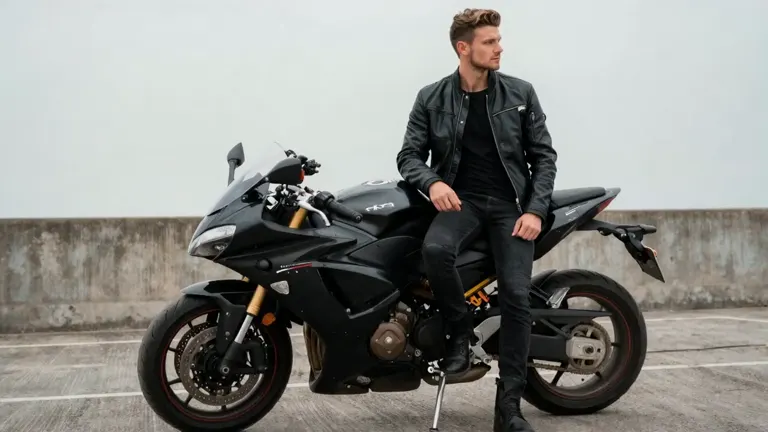
Before
After
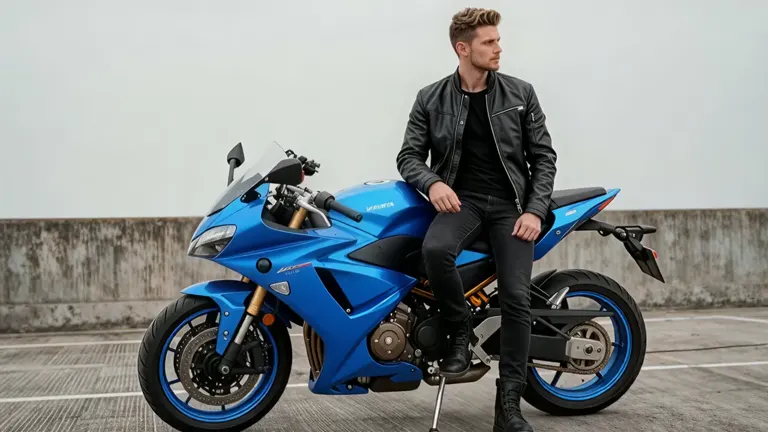
"Change the motorcycle's color to blue."
See AI Video Editing in Action
Real before and after examples showing what AI video editing can do
Cyberpunk Style Transfer
Transform the dancer into a cyberpunk robot in a neon-lit city street.
Character Insert
Insert the guitarist into a full band performance scene.
Background Replace
Replace the park background with a futuristic sci-fi corridor.
Golden Hour Lighting
Apply warm golden hour lighting with rich amber tones and soft lens flare.
AI Video Editor Features
Powerful video editing capabilities powered by the latest AI models
Natural Language Editing
Describe your edits in plain text. No timeline, no keyframes - just type what you want to change and AI handles the rest.
Video Style Transfer
Transform your video into watercolor, anime, cinematic, oil painting, or any artistic style. The AI preserves motion while completely restyling the visuals.
Reference Image Guided
Upload a reference image to guide the edit. Show the AI exactly what style, look, or appearance you want applied to your video.
1080p Output
Edit and export videos in up to 1080p resolution. Choose between 720p for faster processing or 1080p for maximum quality.
Smart Audio Handling
Keep your original audio track intact or let AI regenerate audio that matches the edited visuals. Full control over the soundtrack.
Multiple Aspect Ratios
Output in 16:9, 9:16, 1:1, 4:3, or 3:4. Edit once and export for YouTube, TikTok, Instagram, or any platform.
How to Edit Videos with AI
Three simple steps to transform your videos
Step 1: Upload Your Video
Upload a video file (MP4 or MOV, 2-10 seconds) or paste a video URL. The editor accepts clips up to 100MB.
Step 2: Describe Your Edit
Type what you want to change. Swap styles, modify objects, adjust lighting, change backgrounds - be as specific as you like.
Step 3: Download the Result
Preview your edited video and download it in up to 1080p. Not perfect? Refine your prompt and try again.
Frequently Asked Questions
Everything you need to know about AI video editing
An AI video editor lets you modify existing videos using text instructions instead of traditional editing software. Upload a video, describe the changes you want, and AI applies them automatically - no timeline editing or technical skills needed.
You can change visual styles (watercolor, anime, cinematic), swap or modify objects and characters, adjust backgrounds and environments, change lighting and color grading, modify clothing and appearance, and apply artistic transformations. The AI understands natural language instructions.
The editor accepts MP4 and MOV video files up to 100MB. You can also paste a direct video URL. Output is always in MP4 format.
Input videos must be between 2 and 10 seconds long. For longer videos, trim them to the section you want to edit before uploading.
Video editing is priced by duration at a flat rate of 20 credits per second, regardless of resolution. A 5-second edit costs 100 credits.
Yes. Upload a reference image alongside your prompt to show the AI exactly what style or appearance you want. This is especially useful for style transfers and character redesigns.
Explore More AI Video Tools
Discover our full suite of AI-powered video creation and editing tools
Start Editing Your Videos with AI
Upload a video, describe your edit, and let AI transform it. No editing skills needed.
Edit Video Now