
Seedream 5.5 vs GPT Image 2.6: We Edited One Image 20 Times
Seedream 5.5 vs GPT Image 2.6 in a 20-round editing test: we measured color drift on the face, text and background after every edit. Here's where each breaks.

ByteDance launched Seedream 5.5 on November 9, 2026 with one big claim: you can edit the same image 100 times in a row and the parts you didn't touch stay put, "at the pixel level", with no color shift. It showed the edits. It didn't publish a drift measurement.
So we ran our own. We took one photo, gave Seedream 5.5 and GPT Image 2.6 the same 20 edit instructions one after another, fed each result back in as the input for the next round, and measured how far the untouched parts of the picture moved after every single edit.
The Short Version
- Seedream 5.5 held up. After 20 edits the face, the sign and the back wall look like the original. The numbers show a slow, steady drift that only becomes visible side by side.
- GPT Image 2.6 started drifting on the first edit. Within a few rounds the camera had started to pull back, and by round 10 the whole scene was reframed. By round 20 the face had noticeably altered features and the chalkboard had faded, with one word misspelled and a price nobody asked to change.
- Seedream 5.5 isn't pixel-perfect either. Its untouched areas drifted a little with every round, and one edit caused a visible jump. "No drift" is too strong. "Very little drift" is accurate.
How We Tested
- One starting image, made with a third model (Nano Banana 2.1) so neither model was editing its own output. It has a face, a chalkboard with text, products on a counter and a large flat-colored wall.
- The same 20 instructions for both models, in the same order. Each one changes one small thing: a mug color, a plate with a croissant, flowers, the apron, the counter top, the espresso machine. Three of them change text on the chalkboard. Every instruction ended with "Keep everything else in the image exactly the same."
- A chain, not 20 separate edits. Round 2 edits the output of round 1, round 3 edits round 2, and so on. That's how people actually work on one picture, and it's where errors pile up.
- Same settings: 1K, square, PNG. GPT Image 2.6 ran on its Flare tier, the default on Veevid. OpenAI pitches the other tier, Sunburst, on consistency, and we didn't test it here, so these results are for Flare.
- First result only. No re-rolls, no cherry-picking. All images were generated on November 11, 2026.
To measure drift, we picked three areas that no instruction ever touched: the woman's face, the "MORNING BREW" heading on the chalkboard and the teal wall above the shelves. After every round we compared each area with the original using ΔE2000, a standard measure of color difference. As a rough guide, a ΔE around 2 to 3 is where people start to notice a difference when two images sit side by side. Zero means identical.
All 20 instructions
- Change the red mug on the counter to a cobalt blue ceramic mug.
- Add a small white plate with a golden croissant on the counter, to the right of the mug.
- Replace the small potted succulent with a small glass vase of white tulips.
- Change the color of the woman's apron from mustard yellow to forest green.
- On the chalkboard, change the price 'OAT LATTE 4.50' to 'OAT LATTE 4.95'. Do not change any other text.
- Add a small silver tip jar with a few coins on the counter at the far right.
- Add a soft wisp of steam rising from the mug.
- Add a small round enamel pin shaped like a coffee bean to the apron's left shoulder strap.
- Replace the paper coffee bags on the top shelf with three glass jars of coffee beans.
- On the chalkboard, add a fourth line 'MATCHA 5.25' below 'COLD BREW 3.75', in the same hand lettering. Do not change any other text.
- Add a small embroidered white coffee cup logo on the apron's front pocket.
- Change the wooden counter top to white marble with soft gray veins.
- Add a small brown paper bag with twisted handles on the counter, next to the tulips.
- Change the stainless steel espresso machine to a matte black espresso machine.
- On the chalkboard, change 'COLD BREW 3.75' to 'ICED MOCHA 4.25'. Do not change any other text.
- Change the white tulips to small yellow sunflowers.
- Change the woman's white t-shirt to a light heather gray t-shirt.
- Remove the plate with the croissant from the counter.
- Add a small stack of three paper napkins on the counter in front of the mug.
- Change the blue mug back to a glossy red ceramic mug.
The Drift Curves
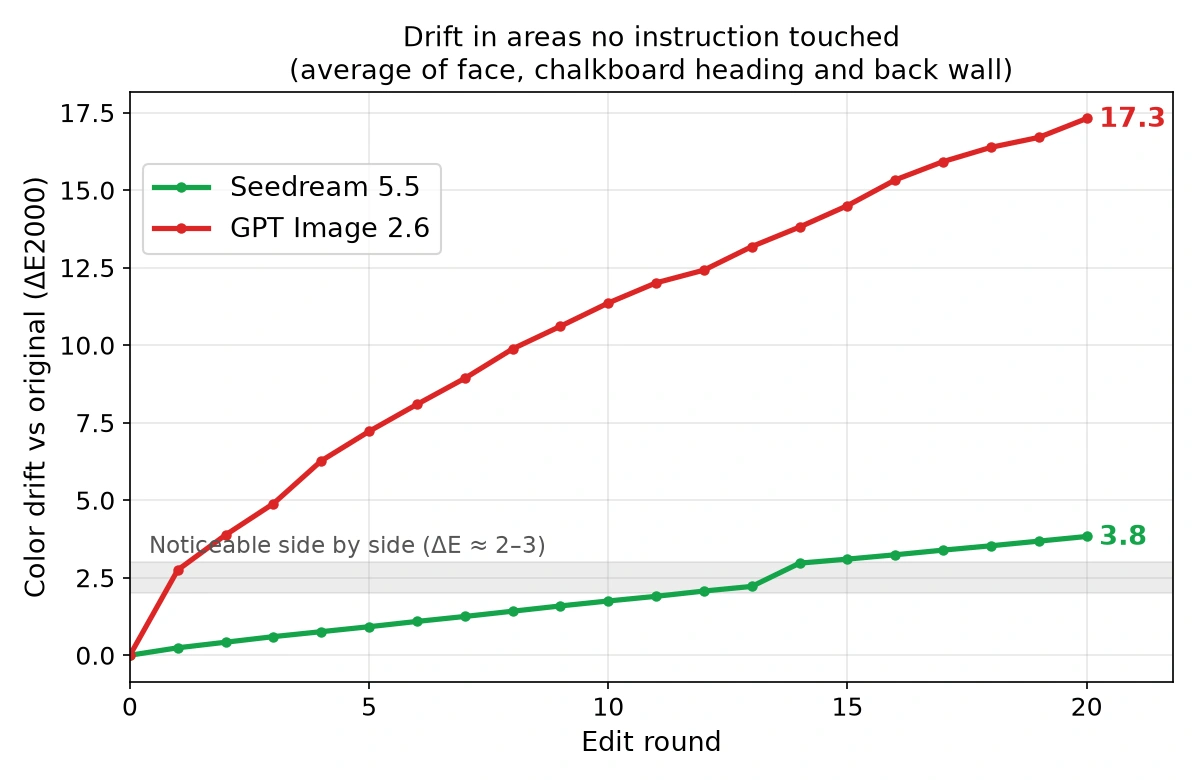
The chart averages the three areas. Here they are one by one:
| Untouched area (ΔE2000 vs original) | Round 1 | Round 5 | Round 10 | Round 15 | Round 20 |
|---|---|---|---|---|---|
| Face - Seedream 5.5 | 0.3 | 0.9 | 1.7 | 3.0 | 3.7 |
| Face - GPT Image 2.6 | 2.5 | 5.5 | 8.7 | 12.2 | 14.8 |
| Chalkboard heading - Seedream 5.5 | 0.3 | 1.0 | 1.8 | 2.9 | 3.6 |
| Chalkboard heading - GPT Image 2.6 | 3.1 | 7.8 | 10.2 | 11.2 | 12.7 |
| Back wall - Seedream 5.5 | 0.2 | 0.9 | 1.8 | 3.4 | 4.3 |
| Back wall - GPT Image 2.6 | 2.7 | 8.4 | 15.2 | 20.1 | 24.4 |
Two things stand out. GPT Image 2.6 moved further on its very first edit than Seedream 5.5 did in its first ten. And the gap keeps widening: on the back wall, GPT Image 2.6 ended up almost six times further from the original.
Faces
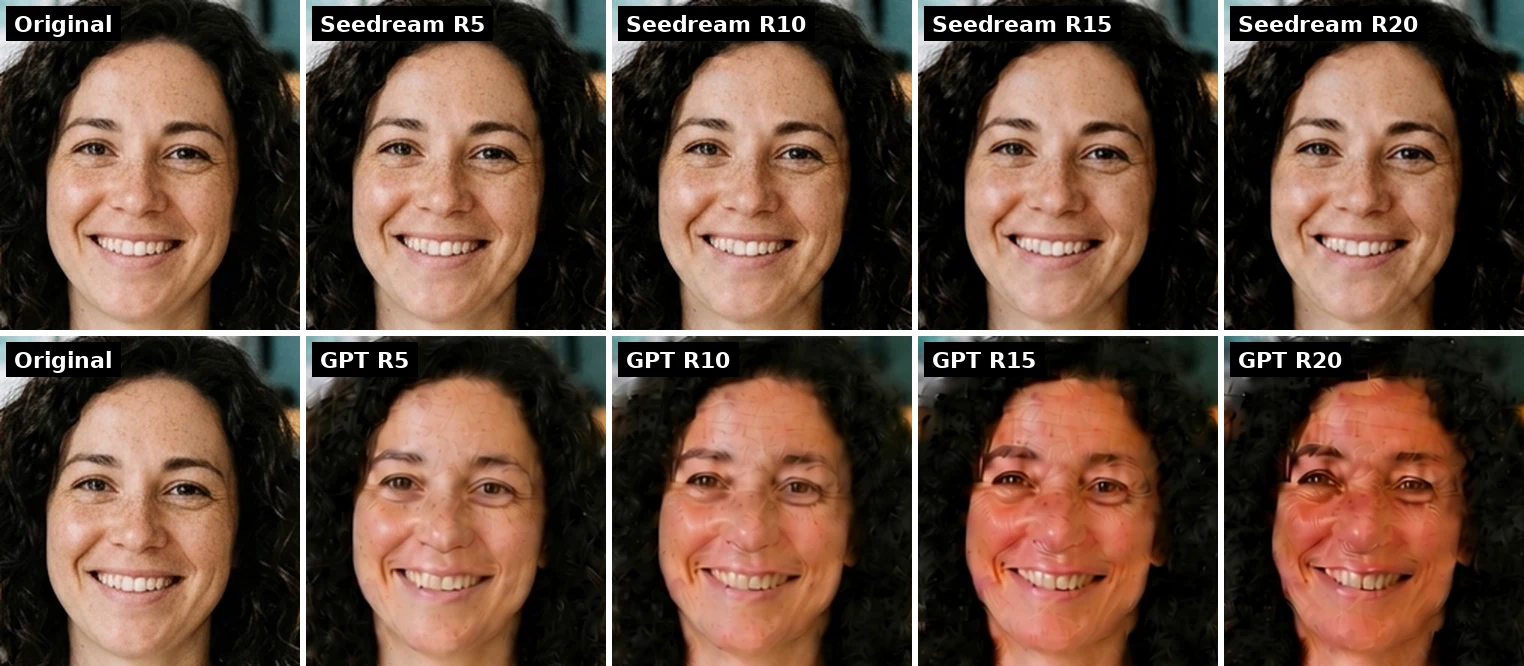
Seedream 5.5's face at round 20 is the same person with the same freckles and the same smile. You'd need the original next to it to spot the slightly warmer skin.
GPT Image 2.6 drifted in one direction the whole way: the skin got redder, a painterly texture crept in around round 10, and by round 20 the features themselves looked noticeably different. None of the 20 instructions mentioned her face.
Text on the Chalkboard
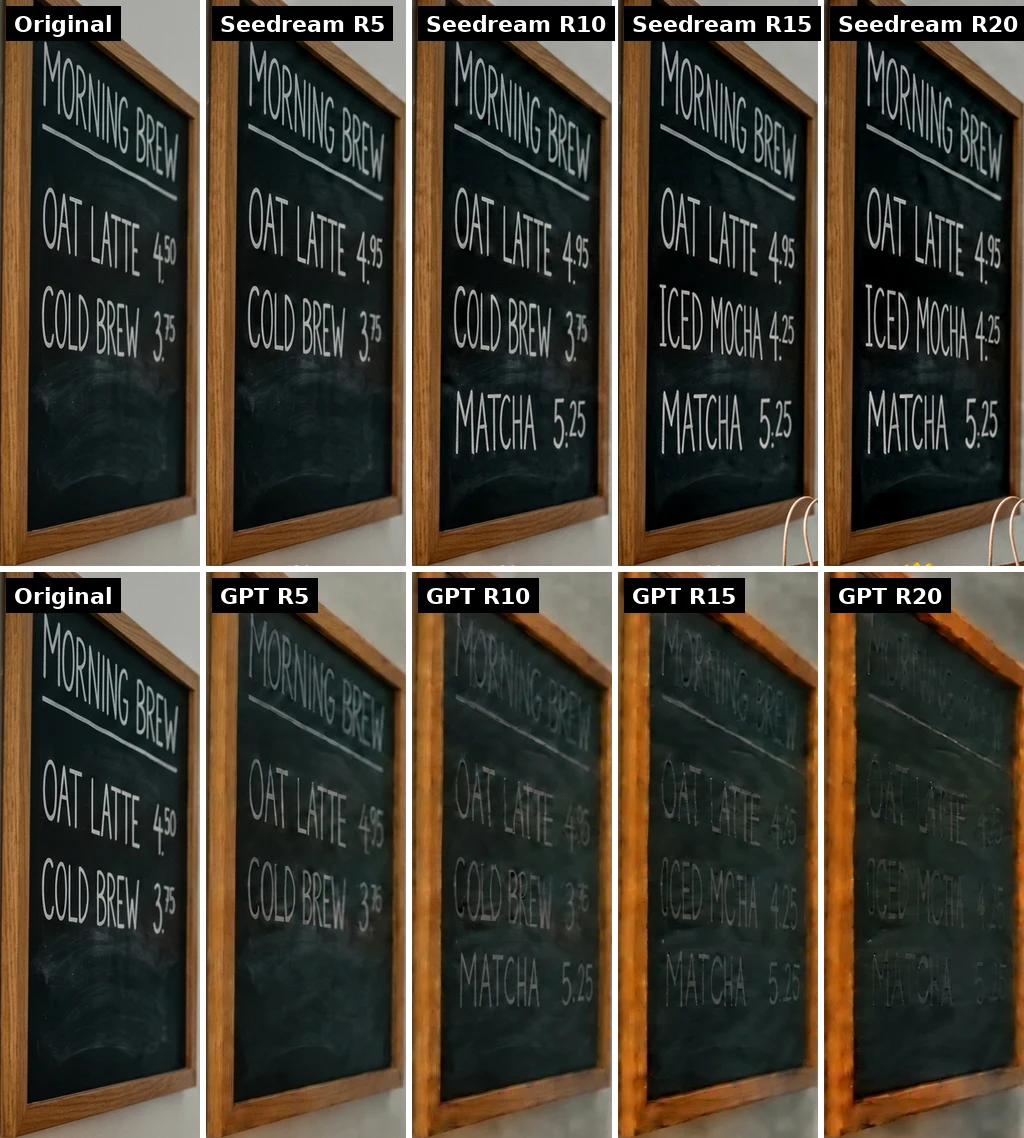
Seedream 5.5 made all three text changes exactly: 4.50 became 4.95, MATCHA 5.25 was added, and COLD BREW became ICED MOCHA. At round 20 the board reads OAT LATTE 4.95, ICED MOCHA 4.25, MATCHA 5.25, and the chalk is as crisp and white as in the original.
GPT Image 2.6 got the first two changes right, then the board started to slip:
- The third change was misspelled. Round 15 wrote "OCED MCHA 4.25" instead of "ICED MOCHA 4.25", and it stayed that way to the end.
- A price changed on its own. The OAT LATTE price we set to 4.95 in round 5 no longer reads 4.95 by the final rounds; it became a smudged "4.?5". It slipped around round 15, the edit that rewrote the line below it. No instruction touched that line.
On top of that, GPT Image 2.6's lettering lost contrast round after round, and by the end the heading is a faint gray. If you're updating prices on a menu or a sale banner over several rounds, a price that quietly changes is the failure that matters most.
Framing and Composition
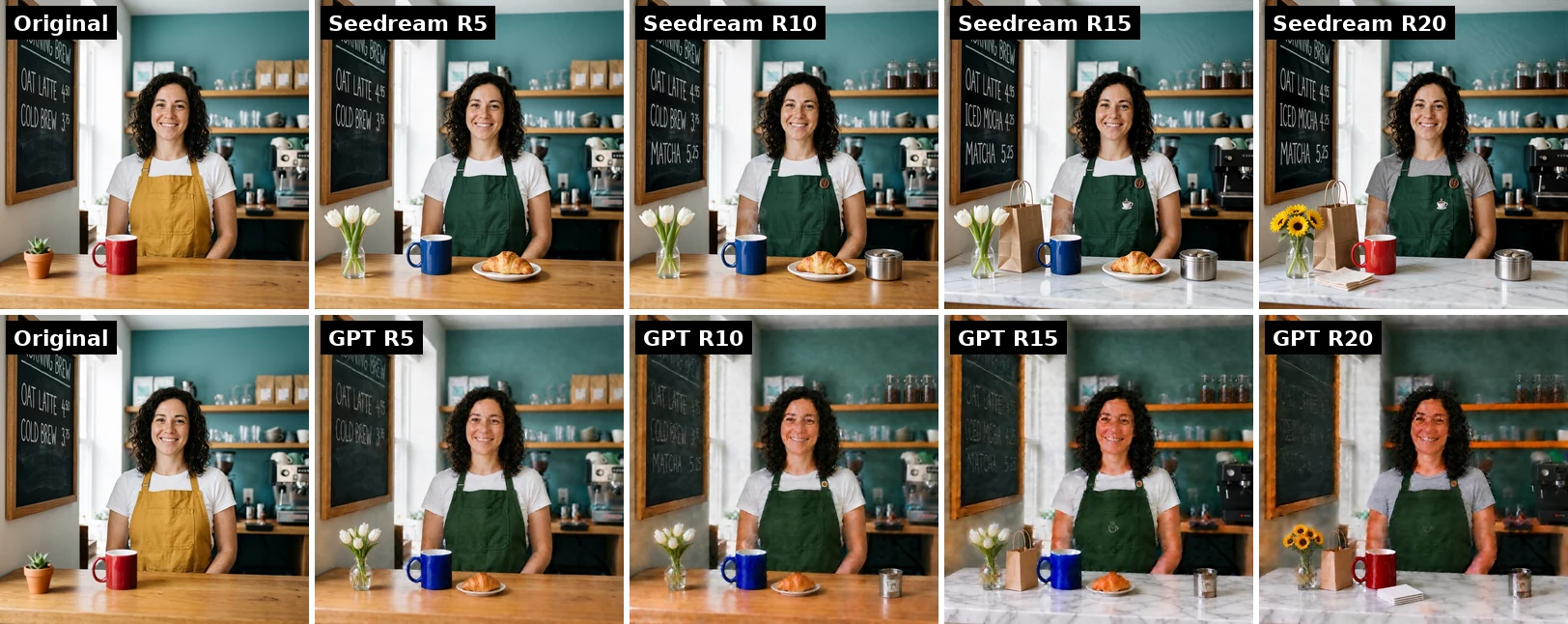
Seedream 5.5 kept the original framing: same crop, same position of the chalkboard, same shelf height. GPT Image 2.6 pulled the camera back within the first few rounds, so everything got smaller and moved, and the colors darkened overall.
The reframing explains part of GPT Image 2.6's high numbers, since an area that has moved no longer lines up with the original. But that's the point of the test: if you ask for a different mug and the whole picture moves, every later edit starts from the wrong place.
Speed was also different. Seedream 5.5 averaged about 17 seconds per edit in our runs, GPT Image 2.6 about 31.
Where Seedream 5.5 Still Drifts
Seedream 5.5 didn't hold the image perfectly still, and the chart shows it:
- The drift is steady. Most rounds added about 0.1 to 0.2 ΔE to each untouched area. That's invisible in one step, but it adds up, and by round 20 all three areas are past the point where a side-by-side comparison shows a slight warm shift.
- One edit caused a jump. Swapping the espresso machine in round 14 pushed all three areas up at once, as if the model had re-rendered more of the picture than it needed to.
That doesn't match "preserved at the pixel level" in the strict sense. If you need 100 rounds, the trend line puts the face well past the noticeable point long before the end. A practical habit: every 10 rounds or so, compare with your original, and if the colors have warmed, start a fresh chain from the original with your edits combined into fewer instructions.
Which One to Use
- Many small edits to one picture (product shots, menus, banners with changing prices): Seedream 5.5. It's the one that kept faces, text and framing intact.
- Changing text in an image more than once: Seedream 5.5. Seedream 5.5 got every word and price right. GPT Image 2.6 misspelled one edit and changed a price nobody asked about.
- A single edit or a new image: either. The drift only shows up as edits stack.
- Animated GIFs: GPT Image 2.6, which can turn a prompt or a photo into a looping GIF. Seedream 5.5 only makes still images.
- If you do chain edits in GPT Image 2.6: go back to your original every few rounds instead of editing the last output.
Try Both
- Seedream 5.5 on Veevid - text to image and multi-round image editing, with transparent PNG output
- GPT Image 2.6 on Veevid - still images and animated GIFs
Sources
- ByteDance Seed - Introducing Seedream 5.5 - the 100-round editing claim and the release date
Every image and number in this post comes from our own runs on November 11, 2026, one chain per model, first result kept. One chain is not a benchmark, but the gap here was large and consistent across all three areas we measured.