FLUX 3 Image vs Ideogram 4.5: Text, Edits and 4K Tested Side by Side
FLUX 3 Image vs Ideogram 4.5 on the same prompts: text rendering, single edits, three edits in a row, multiple references and resolution. Real outputs, first attempts.

FLUX 3 Image and Ideogram 4.5 shipped one day apart. Ideogram 4.5 arrived on September 30, 2026 with the pitch that you can edit the same picture again and again without it falling apart. FLUX 3 Image followed on October 1 with native 4K, up to 10 reference images and layouts you set with coordinates.
The comparisons that rank for this pair today were written before FLUX 3 Image had a public endpoint. We run both models, so we gave them the same prompts and the same source images and kept the first result from each. FLUX 3 Image is on Veevid. Ideogram 4.5 is on our sister site, AI Photo Editor.
The Short Version
| FLUX 3 Image | Ideogram 4.5 | |
|---|---|---|
| Released | October 1, 2026 | September 30, 2026 |
| Text-to-image output | 1K, 2K or 4K (about 16 megapixels) | About 1 megapixel |
| Edit output size | 1K, 2K or 4K at the ratio you pick | Same pixel size as your upload |
| Images per edit | Up to 10 references | 1 source plus up to 4 references |
| Layout control | Bounding boxes in the prompt | None, but you can mask the area to edit |
| Untouched pixels after 3 edits | Unchanged by default | Unchanged in high precision, drifts in regular |
| Speed in our runs | 24 to 31 s to generate, 34 to 82 s to edit | 16 to 17 s to generate, 20 to 24 s to edit |
Text rendering is missing from that table on purpose. Both models got every word right.
How We Tested
- FLUX 3 Image at 1K, JPEG output, unless a test says otherwise
- Ideogram 4.5 on its High quality tier (the API's
mediumsetting) with its default prompt expansion left on - Same prompt for both models. For edits, the same source image
- One run per test, and the first result is the one shown
One run is not a benchmark. Treat the results as a look at how each model behaves, not a ranking.
Text Rendering: A Tie
The poster prompt asked for a headline, a line with a venue, a date and a time, and a small footer with a URL.
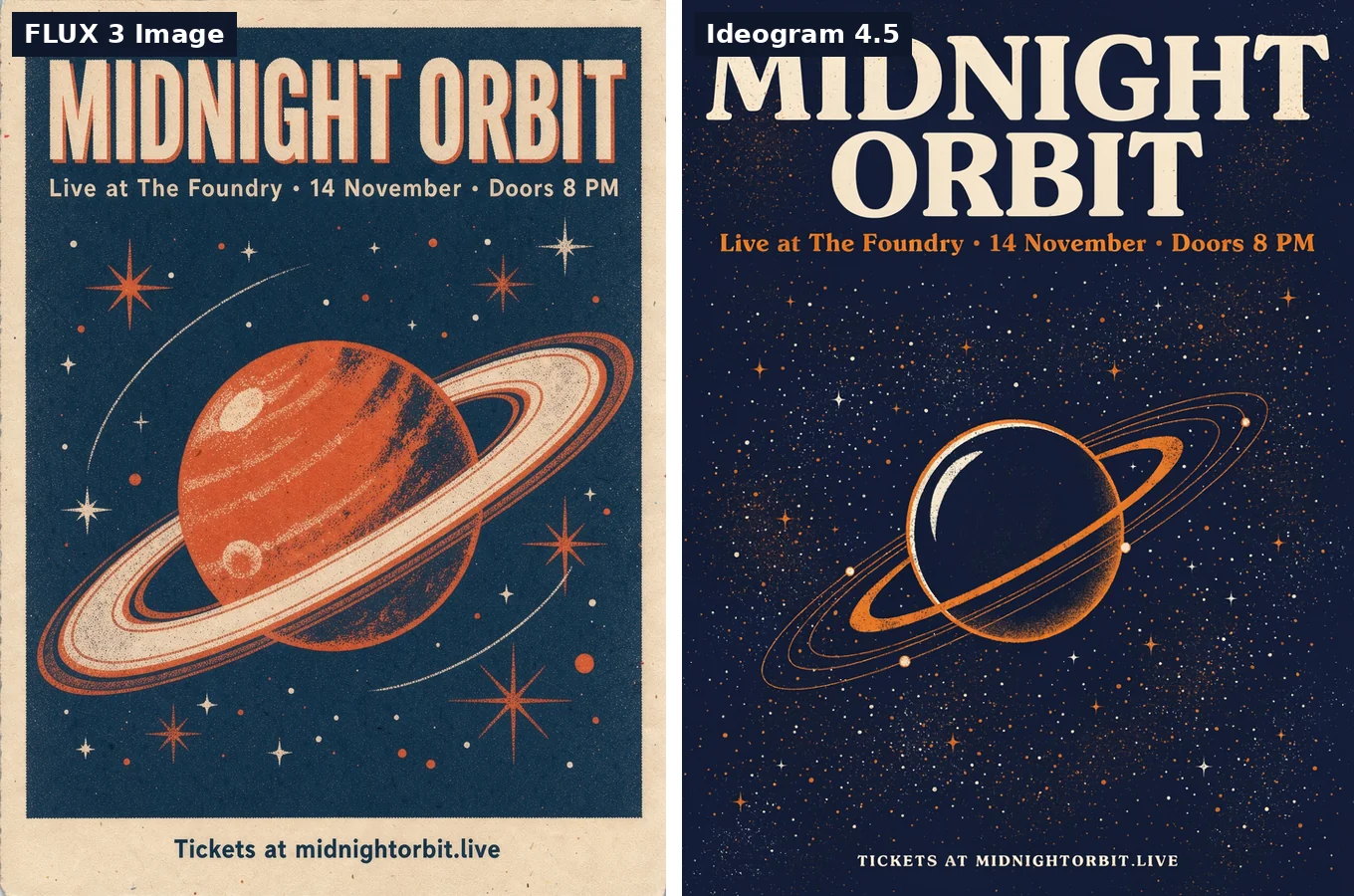
Both spelled "MIDNIGHT ORBIT", "Live at The Foundry · 14 November · Doors 8 PM" and "Tickets at midnightorbit.live" correctly. The styling differs: Ideogram 4.5 set the footer in small caps, FLUX 3 Image kept it as typed.
The menu prompt had a title and five lines, each with a price.
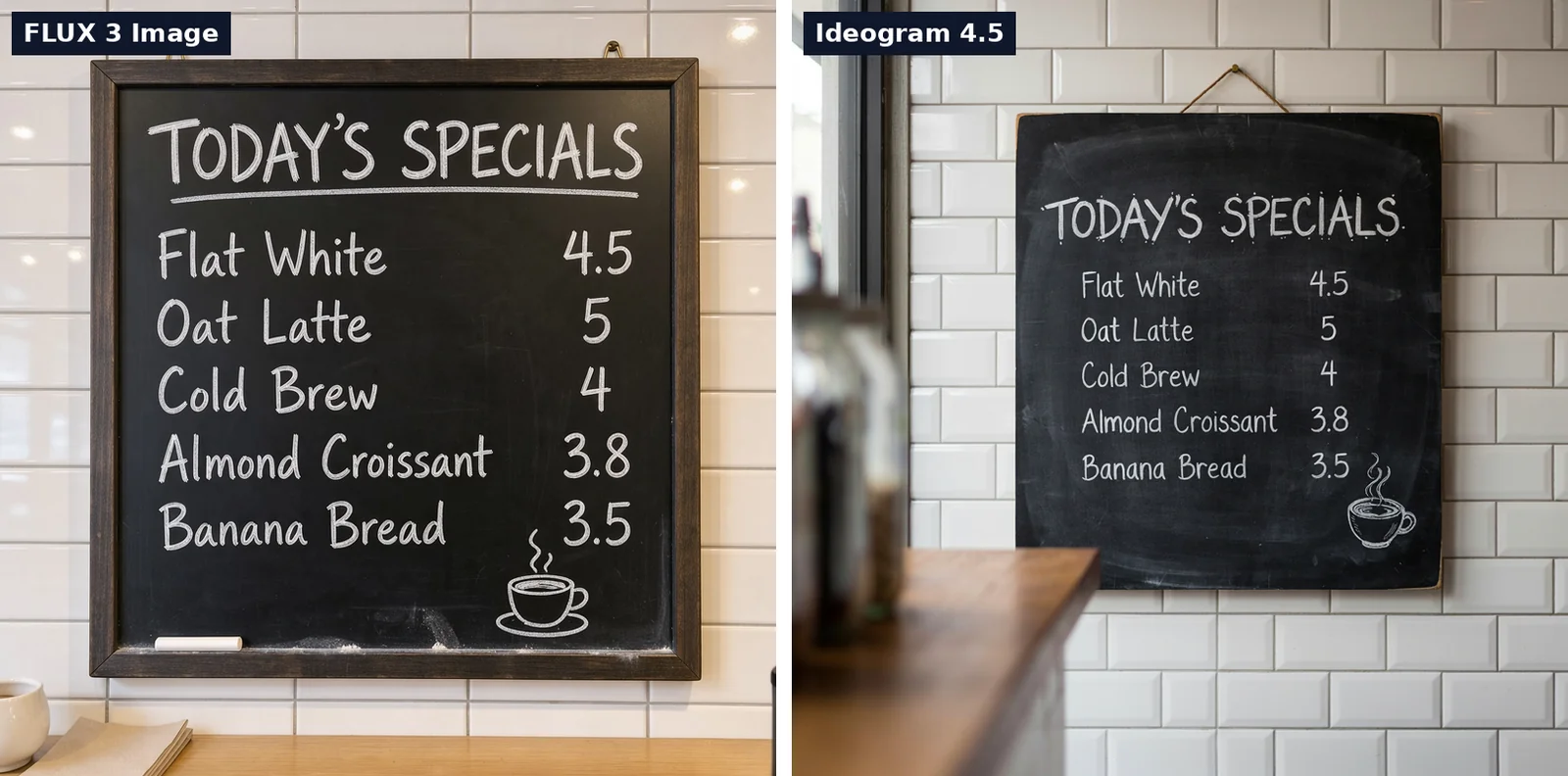
Again, no mistakes from either model: five items, five prices, all in the right order. If readable text is the only thing you need, you can pick either.
Following the Prompt
A plain photo prompt, no text: a golden retriever puppy running through shallow water at sunset, backlit, with water droplets frozen in the air.
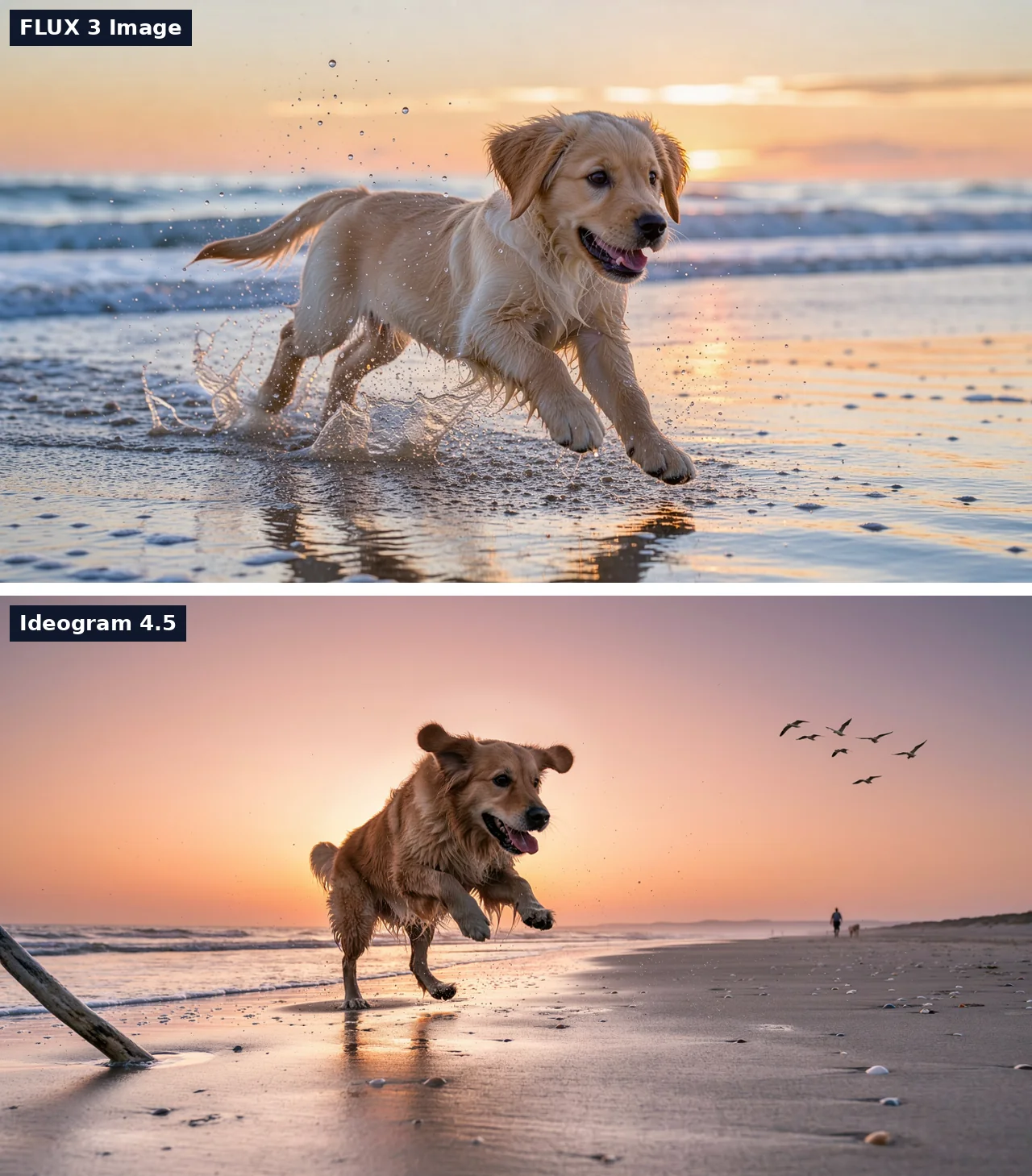
FLUX 3 Image delivered what the prompt listed: a puppy, shallow water, droplets. Ideogram 4.5 produced a striking sunset shot, but the dog is older, it's running on wet sand rather than through water, and the frame gained birds and a distant walker nobody asked for. Ideogram's prompt expansion rewrites your prompt before generating, which is likely why. It's one sample, but if you want exactly the scene you described, this round goes to FLUX 3 Image.
One Edit: Change a Sign and the Season
Source image: a bakery storefront. Instruction: change the sign to read "SUNRISE BAKERY" and make it a snowy winter evening, keeping the storefront and the chalkboard the same.
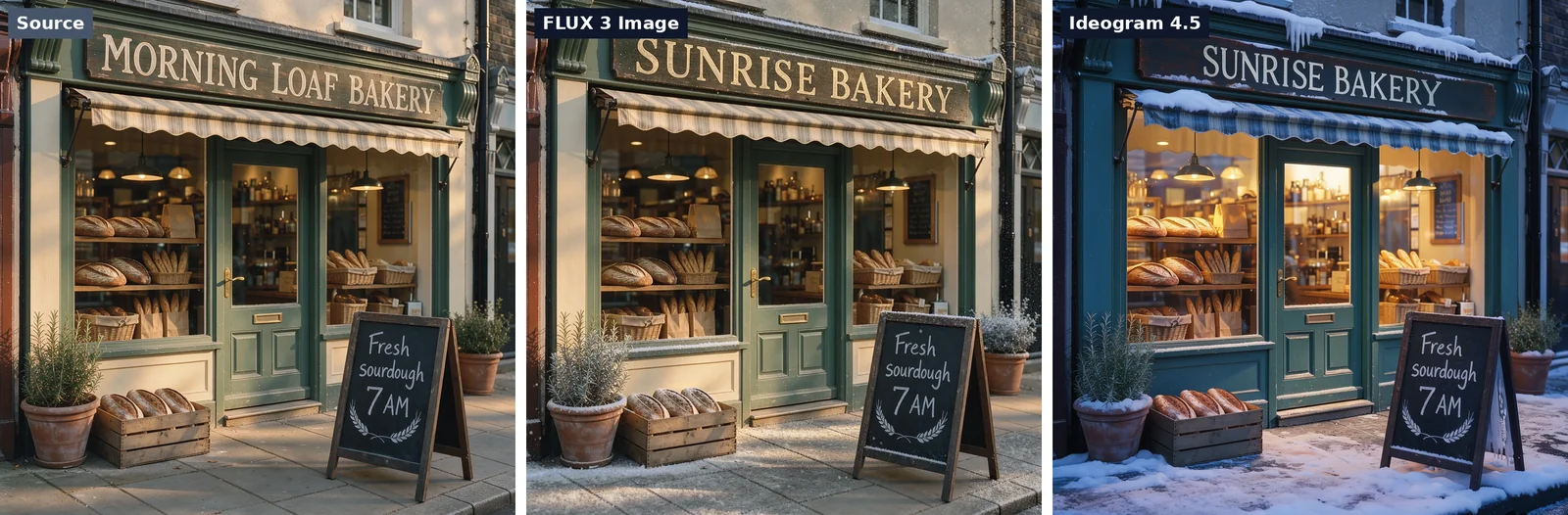
Both rewrote the sign correctly and left the chalkboard wording alone. They read "snowy winter evening" very differently:
- FLUX 3 Image was conservative. A dusting of snow, the same cream-and-green shopfront, the same light. It's clearly the same photo
- Ideogram 4.5 committed to the mood. Deep snow, blue evening light, glowing windows. It also repainted the shopfront teal and changed the awning, which the instruction said to keep
Which one is better depends on the job. For a seasonal campaign image, Ideogram's version is the more finished picture. For "change this and nothing else", FLUX 3 Image stayed closer to the brief.
Three Edits in a Row
This is the test Ideogram 4.5 was built for. Starting from one living room photo, each edit used the previous result as its input: swap the sofa, repaint the wall, add a plant.
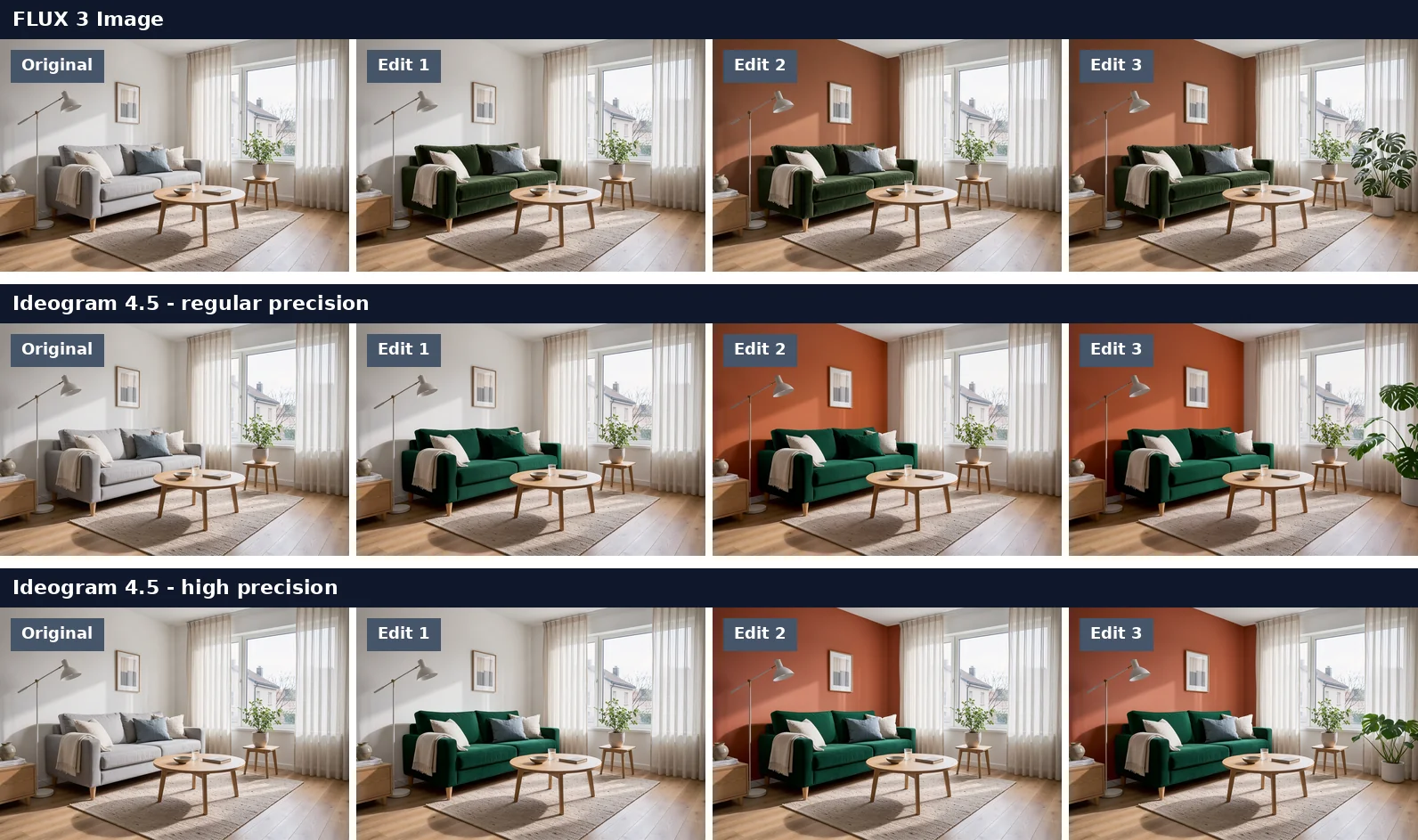
By eye, all three rows hold up. The room, the light and the furniture stay put through every step.
So we measured it. We took a patch of rug and floor that no edit was supposed to touch and compared it with the original, pixel by pixel. The number is the average difference per color channel on a 0 to 255 scale. For reference, re-saving the original as a JPEG moves the same patch by about 3.4.
| After edit 1 | After edit 2 | After edit 3 | |
|---|---|---|---|
| FLUX 3 Image | 0.08 | 0.10 | 0.10 |
| Ideogram 4.5, regular precision | 6.98 | 10.78 | 13.59 |
| Ideogram 4.5, high precision | 0.09 | 0.09 | 0.09 |
Two takeaways:
- FLUX 3 Image leaves untouched areas alone by default. After three edits the patch is closer to the original than a JPEG re-save would be
- Ideogram 4.5 does the same, but only in high precision. In regular precision the picture is regenerated each time and small differences add up. You won't notice it after one edit, but the gap grew with every step in our run
If you plan to stack edits in Ideogram 4.5, turn on high precision in the advanced settings. It took about the same time in our runs.
Combining Reference Images
Three inputs: a portrait, a yellow rain jacket and an orange suitcase. The prompt asked for the man wearing the jacket and pulling the suitcase along a rainy train platform at dusk.
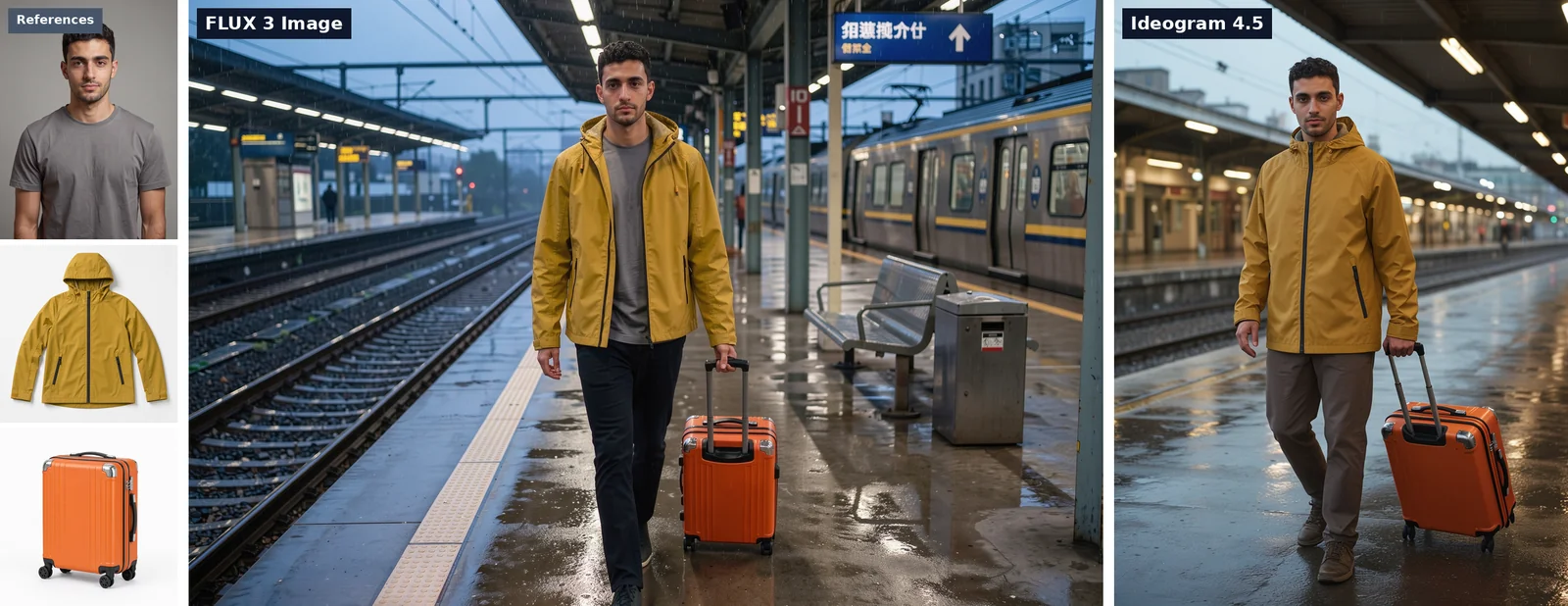
Both kept the face, the jacket and the suitcase recognizable. The differences are in how you work with them:
- FLUX 3 Image takes up to 10 references and you name them in the prompt as
ref_image_0,ref_image_1and so on. You choose the output ratio and resolution, so this one came out as a wide 2K frame - Ideogram 4.5 takes one source image plus up to 4 references. Its output follows the source image, so the result stayed portrait
A note on that Ideogram run: the first attempt returned an error at the portrait's original size, so we reran it with the 4:3 portrait preset. It's the only test here that needed a second try.
What Only FLUX 3 Image Does
Native 4K. Ideogram 4.5 generates at about one megapixel. FLUX 3 Image goes up to roughly 16, and it renders at that size instead of upscaling. This frame is 5456 x 3072.
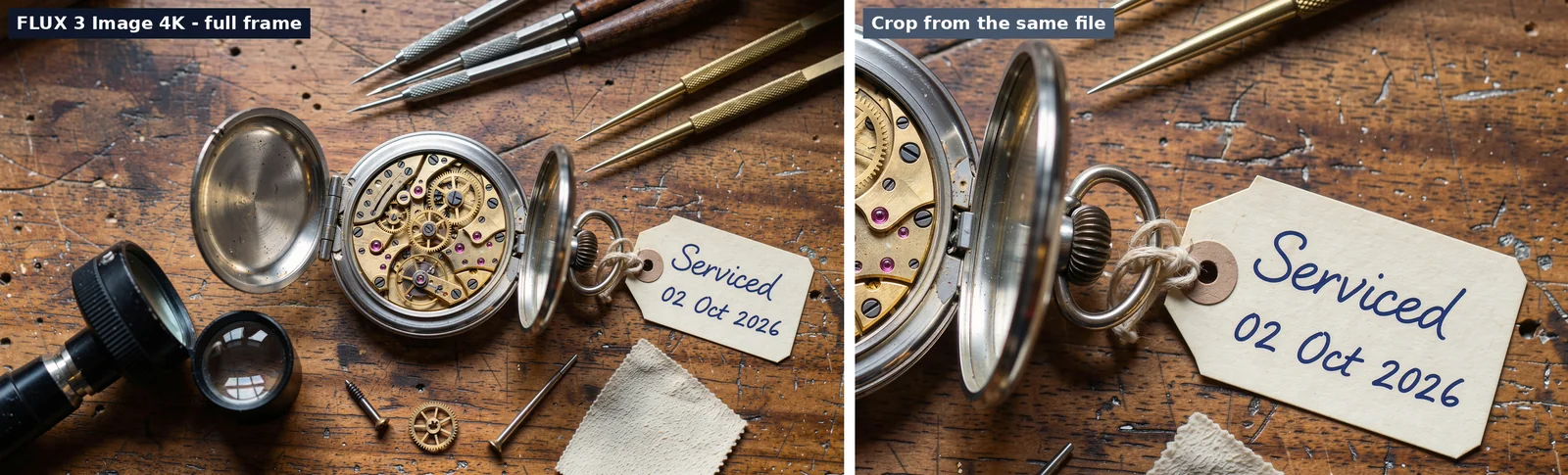
4K is slow and it's the most expensive option of anything in this post, so it's for the final version of an image, not for exploring ideas.
Bounding-box layouts. Add a list of elements to the prompt, each with an id, a box on a 0 to 1000 grid and a description, and FLUX 3 Image puts them there.
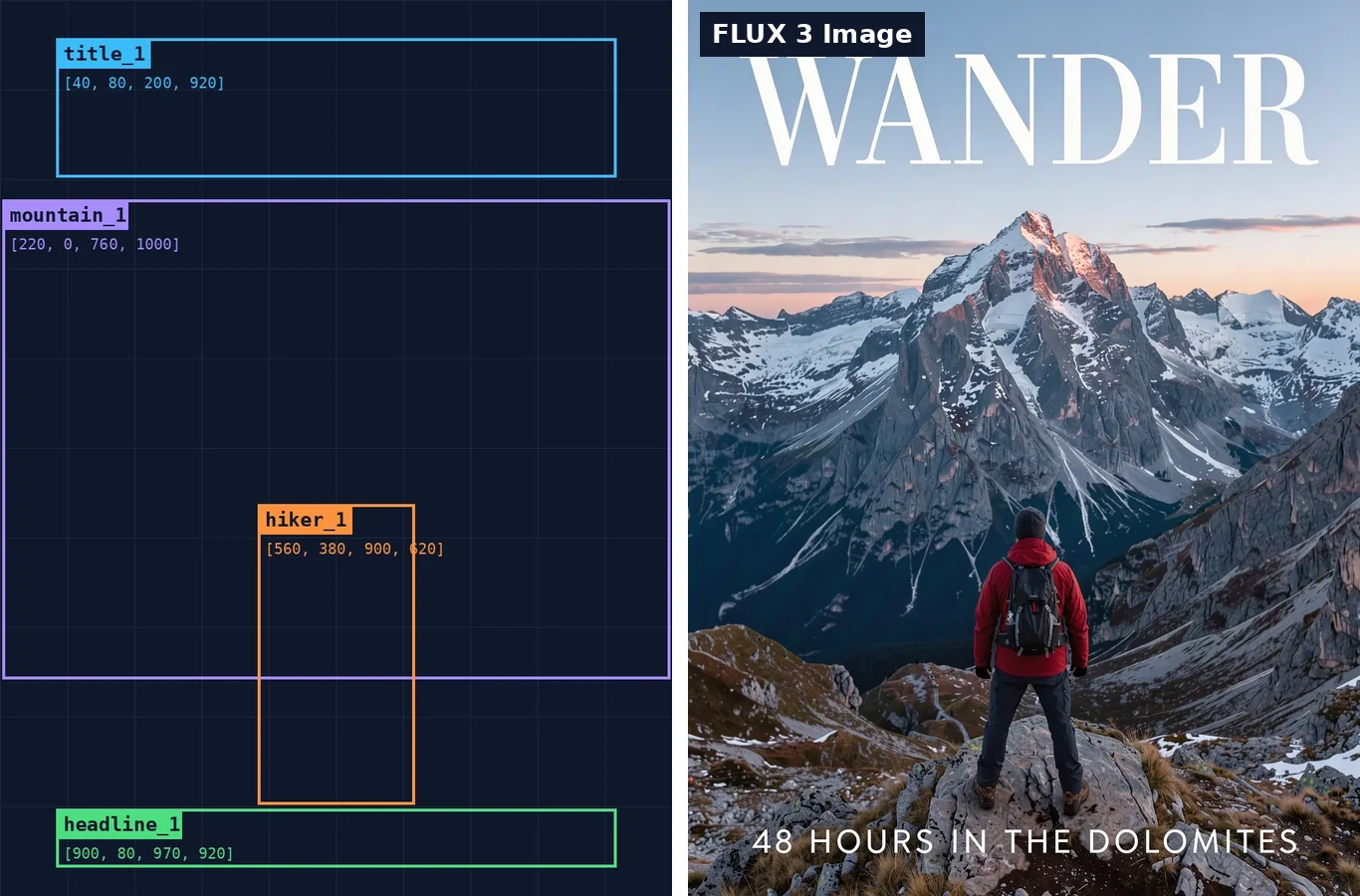
For covers, ads and product composites, where position matters as much as content, nothing in Ideogram 4.5 matches it. You can load this exact prompt from the Magazine cover example on the FLUX 3 Image page.
What Only Ideogram 4.5 Does
Same size back. An edit returns at the pixel size of your upload. If you need to change one word on a finished 1080 x 1350 social graphic and hand it straight back, that matters. FLUX 3 Image outputs at one of its own sizes.
Masks. You can upload a mask to say exactly which area may change. FLUX 3 Image on Veevid works from the instruction alone.
Speed and a cheap entry tier. Ideogram 4.5 was faster in every test we ran, and its lowest quality tier is the cheapest way to make a small edit of anything in this comparison. For the common job of fixing text on an existing image, there's a dedicated edit text in image tool built on it.
Which One to Use
- Fix or change something on an existing image, and get it back at the same size: Ideogram 4.5
- Many small edits to one picture: either. FLUX 3 Image by default, Ideogram 4.5 with high precision on
- Readable text in a new image: either
- A scene that matches the prompt closely: FLUX 3 Image
- Four or more reference images in one picture: FLUX 3 Image
- Print-size output, or a layout where position matters: FLUX 3 Image
- Fast drafts on a budget: Ideogram 4.5
Try Both
- FLUX 3 Image on Veevid - the generator is on the page with FLUX 3 Image selected, and the examples load with one click
- Ideogram 4.5 on AI Photo Editor - image editing and text to image
Sources
- FLUX 3 Image - Black Forest Labs
- FLUX 3 Image text-to-image API and edit API - fal
- Ideogram 4.5 announcement - Ideogram
- Ideogram 4.5 API and edit API - fal
- All images in this post were generated by us on October 2, 2026