Seedance 2.5 Image to Video with GPT Image 2.5: Workflow and Prompts
Seedance 2.5 image to video works best when GPT Image 2.5 designs the frame first. Two tested workflows, frame break examples, and the exact prompts we used.

On October 3 a creator posted a 20-second clip of John Wick fighting Mr. Bean on a sunny London street: a knife dodged by tying a shoelace, an umbrella that blocks every punch, a fish slap, and a bazooka pulled out of a tweed jacket. It passed a million views within a day. The caption gave away the whole recipe in one line: Seedance 2.5 + GPT Image 2.5.
That pairing is worth understanding properly, because it isn't really about one viral clip. GPT Image 2.5 is very good at the things video models are weak at, like exact composition, faithful character design and clean typography. Seedance 2.5 is good at what image models can't do at all: motion, camera, timing and sound. Split the job between them and you get far more control than writing one long text-to-video prompt and hoping.
We ran the workflow end to end on Veevid, where both models are live. Every image and video below came from those runs, and every prompt is printed in full so you can reuse it.
Two Ways to Combine Them
There are two distinct workflows, and they suit different shots.
| First frame (Image to Video) | Character sheet (Reference to Video) | |
|---|---|---|
| What GPT Image 2.5 makes | The exact opening frame | A sheet showing each character |
| How Seedance 2.5 uses it | As frame one of the video | As a reference, the opening shot is free |
| Best for | Precise compositions, frame break effects, product shots | Multi-cut scenes, fights, stories with recurring characters |
| Output ratio | Follows the image | You choose |
| Where on Veevid | Seedance 2.5 page or Image to Video | Reference to Video |
The viral clip used the second method. Most people trying to copy it reach for the first, which is why their versions open on a poster instead of a scene.
Method 1: GPT Image 2.5 as the First Frame
This is the simplest version and the one that gives you the most control over what the shot looks like.
- Make the still in GPT Image 2.5. Pick the aspect ratio you want the video to have, since Seedance 2.5 keeps the ratio of the first frame. 16:9 for YouTube, 9:16 for Reels and Shorts.
- Send it to Seedance 2.5. Download the image and upload it as the starting image in Image to Video with Seedance 2.5 selected. You can also start from the Seedance 2.5 page.
- Prompt the motion, not the picture. The image already describes the scene. The video prompt should only describe what happens next.
Here's the setup shot, generated in GPT Image 2.5 with original characters:
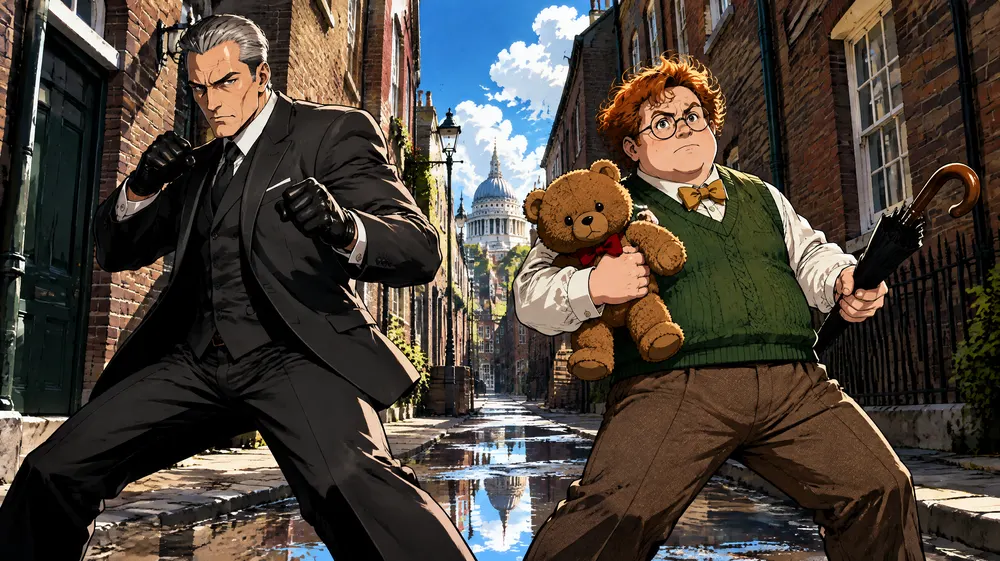
GPT Image 2.5 prompt: Wide cinematic 16:9 film frame in cel-shaded 3D anime style: a narrow London brick street at midday, bright sunshine, puddles reflecting the sky. A silver-haired assassin in a charcoal three-piece suit and black gloves stands on the left in a precise fighting stance, fists raised. A round clumsy gentleman with ginger curls, round glasses, a green knitted vest and a yellow bow tie stands on the right, holding his teddy bear up like a shield and a closed umbrella like a sword, completely serious. Low camera angle, bold flat color blocking, hard edge shadows, thick black outlines, film grain. No text.
And the 10-second Seedance 2.5 result at 720p, with audio generated in the same pass:
Seedance 2.5 prompt: Cel-shaded 3D anime fight comedy, one continuous take. 0-3s: the silver-haired assassin fires a lightning-fast jab-cross combination; the ginger gentleman pops open his umbrella at the last instant and every punch thuds harmlessly into it. 3-6s: the assassin rips the umbrella away and tosses it; the gentleman holds his teddy bear up like a shield, the assassin's punch sinks into the bear with a squeak, and the gentleman checks the bear for damage with genuine indignation. 6-10s: the assassin lunges for his collar; the gentleman pulls a huge raw fish out of his vest and slaps him across the face with a loud wet slap, fish scales stuck on the assassin's cheek, his cold expression frozen in disbelief. Camera switches between low wide shots, side angles and extreme close-ups on faces. Bold flat colors, hard shadows, thick outlines, film grain. Orchestral score swinging between deadly serious and absurd comedy.
Notice that the video prompt never re-describes the costumes or the street. The still carries all of that, and Seedance 2.5 held both character designs through every cut.
The Frame Break Effect
A frame break (also called out-of-frame or pop-out) shot is one where the subject escapes its border: a character climbs out of a comic panel, a player dunks out of a phone screen, a figure steps out of a photo. It's one of the most shared formats on short-video feeds right now, and it's a perfect fit for the first-frame method.
The trick is to start the break in the still. If the image shows the subject fully inside the frame, the video model has to invent the escape and often doesn't. If the image already shows an arm, a blade or a ball crossing the border and casting a real shadow outside it, Seedance 2.5 just has to finish the motion.
Samurai Out of a Comic Panel
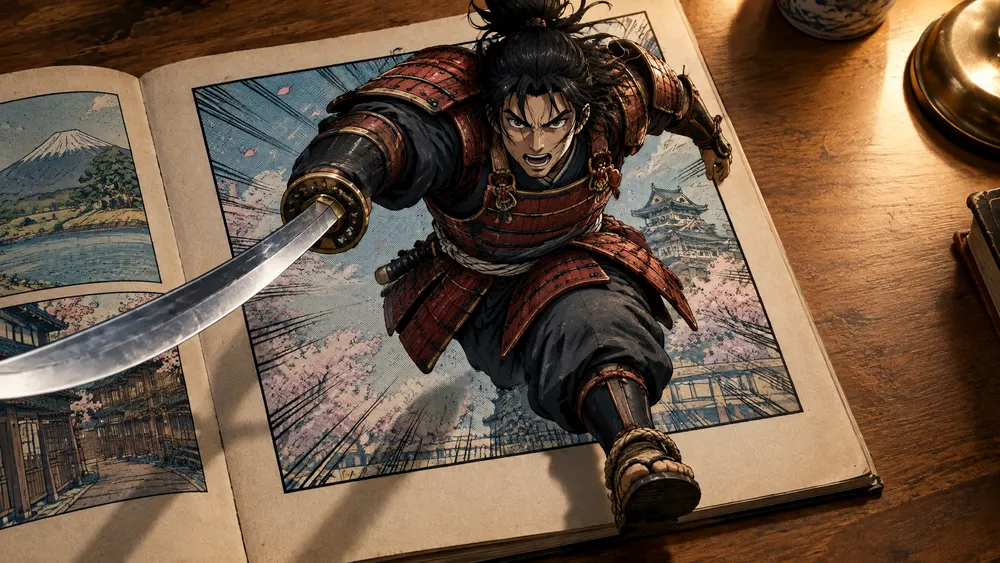
GPT Image 2.5 prompt: Photorealistic overhead-angled photo of an open vintage comic book lying on a wooden desk, warm desk-lamp light. The right page shows one large comic panel with a thick black border: a fierce cel-shaded anime samurai in red-and-black armor, katana drawn, mid-leap toward the viewer. FRAME BREAK effect: the samurai's sword blade, his right arm and one sandaled foot already burst out past the panel border and extend into the real 3D space above the paper, casting real soft shadows on the page and the desk. Halftone dots and speed lines inside the panel, crisp realistic paper texture outside it. Strong depth, 16:9, high detail, no speech bubbles, no text.
Seedance 2.5 prompt: The anime samurai bursts completely out of the comic panel: he slashes his katana in a wide arc, kicks off the panel border and leaps off the page into the real world, landing in a crouch on the wooden desk next to the comic book as a small 3D figure with real shadows and lamp light on his armor. Paper corners flutter, a few cherry-blossom petals and halftone speed lines spill out of the panel with him. Camera slowly pushes in and tilts down to follow him. He rises, flicks his sword and looks straight into the lens. Sound: paper ripping, a sharp sword swish, a soft thud on wood, a short taiko drum hit.
Dunk Out of a Phone Screen (9:16)
The same idea on a vertical frame, ready for Reels and Shorts without cropping:
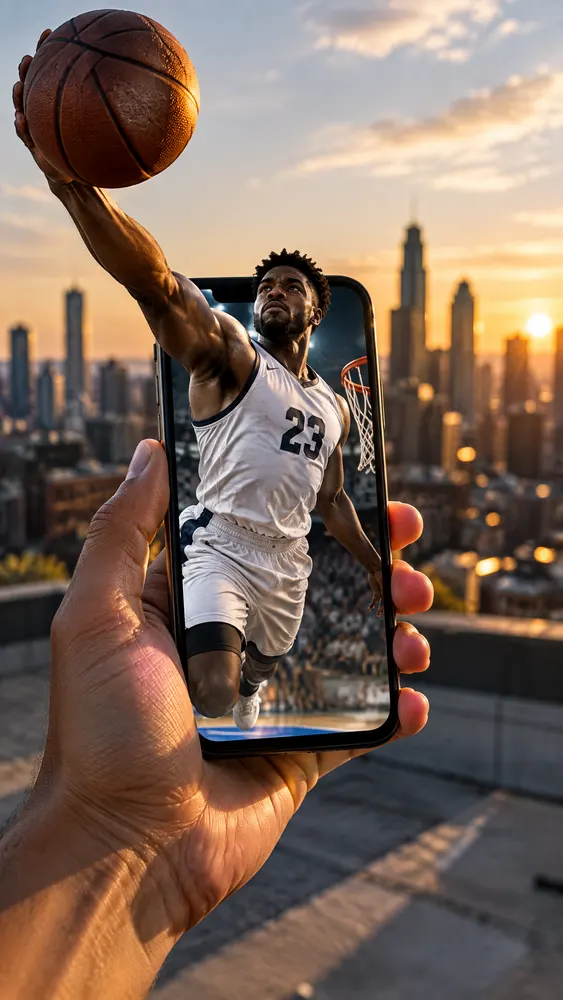
GPT Image 2.5 prompt: Photorealistic shot of a hand holding a smartphone vertically on a city rooftop at golden hour. On the phone screen, a professional street basketball player in a white jersey with the number 23 is rising for a dunk. FRAME BREAK effect: his arm and the basketball already break out of the phone screen's edge into the real world, larger than the phone, casting real shadows on the hand; the rest of his body is still inside the screen. Realistic lighting, shallow depth of field, city skyline bokeh behind, 9:16 vertical, high detail, no logos, no text.
Seedance 2.5 prompt: The basketball player explodes out of the phone screen into the real rooftop: his whole body pushes through the screen edge, he rises above the phone and slams the ball down with a powerful one-handed dunk motion, then lands on the rooftop floor behind the hand at full human size, casting a long golden-hour shadow. The phone screen behind him now shows an empty court. The hand holding the phone jolts slightly. Camera tilts up with the jump and pulls back to reveal him standing on the roof against the skyline. Sound: crowd roar from the phone speaker, a whoosh, a heavy ball bounce, city wind.
Seedance 2.5 added the shattering glass on its own, which is a nice touch we didn't ask for. Both frame break renders worked on the first attempt.
Method 2: A Character Sheet as Reference
This is what the viral clip actually did. Instead of a first frame, GPT Image 2.5 makes a VS character sheet: both characters side by side, each with their costume and props. Seedance 2.5 then gets that sheet as a reference image and a long, timestamped prompt.
Because the sheet is a reference rather than frame one, the video can open on any shot and cut freely between wide angles and close-ups while both characters stay on model. That's how the original packs about 20 camera cuts into one generation.
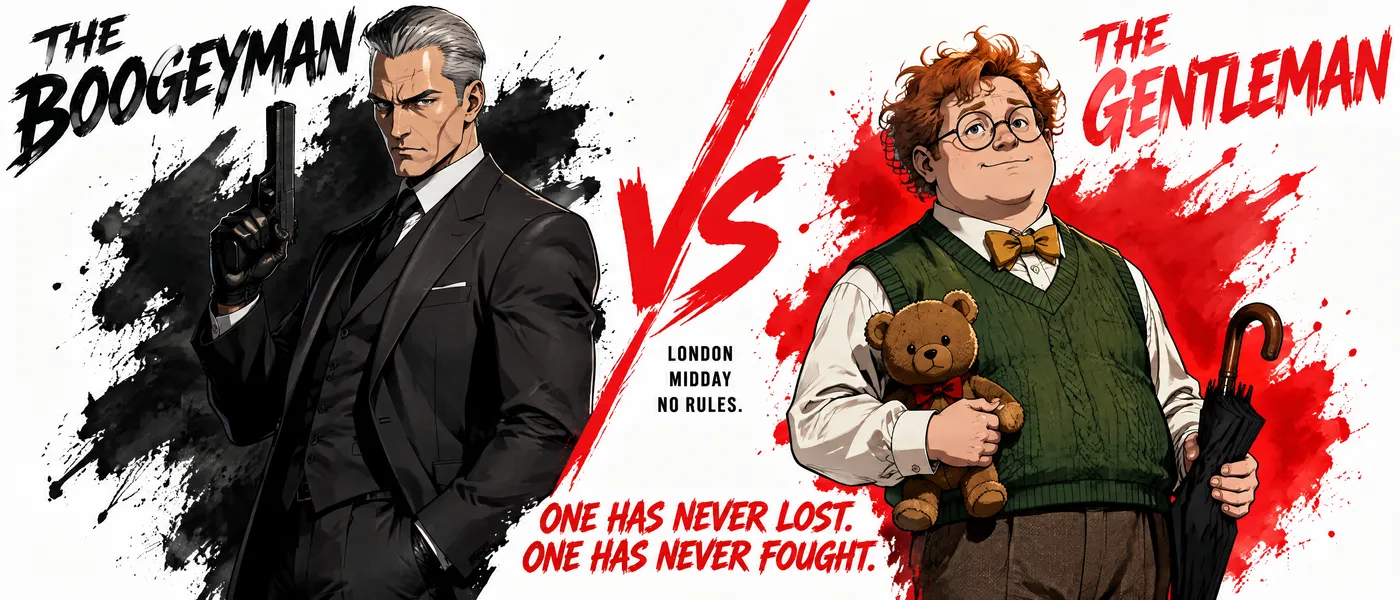
This 15-second take came from one Reference to Video request. The prompt opened with "Use @Image1 as strict visual reference for both characters", named each character with a short look description, then laid out five beats of three seconds each, ending on "Cut to black, a single teddy bear squeak." The model hit every beat: the knife in the wall, the umbrella block, the teddy bear close-up, the fish slap, the bazooka and the final eye close-up.
If you'd like more on how references work in this model, our Seedance 2.5 vs 2.0 breakdown covers the 50-slot reference system in detail.
Why We Didn't Use John Wick and Mr. Bean
We tried, with a photoreal lobby still and a stylized VS poster. Seedance 2.5 refused every version, and at two different points:
- At upload. A photoreal first frame was rejected straight away because the input image "may contain real person."
- After rendering. The stylized versions got through the upload check, rendered for several minutes, then failed because the output "may be related to copyright restrictions." That held for a stylized reference sheet and even after we removed both names from the prompt.
The block is on the likeness itself, not on the words in your prompt. If you're planning a celebrity or famous-character mashup, expect it to fail on Seedance 2.5 and budget your time accordingly. The comedy in that clip comes from the formula, not the faces: one deadly serious fighter, one who wins by accident, and props that escalate. Original characters with strong silhouettes carry it just as well, and you can actually publish them.
Prompt Tips That Made the Difference
- Write the next three seconds, not the scene. In image to video, anything already visible in the still is wasted words in the video prompt.
- Use timestamped beats. Lines like
0-3s:and3-6s:kept a 10 to 15 second take on script far better than one long paragraph. - Add a sound line. Seedance 2.5 generates audio with the picture. Naming the slap, the squeak or the taiko hit gives you sound design that lands on the action.
- Set the ratio in GPT Image 2.5. In image to video the output follows the first frame, so a 9:16 still gives you a 9:16 video.
- Keep fights slapstick. Our first reference render turned the fish slap into what looked like a bloody face. Adding "shiny silver scales and a strand of seaweed, no blood, no injuries" fixed it.
- Try the end frame for exact landings. Seedance 2.5 on Veevid also accepts an optional end frame, which helps when the last pose has to match a product shot or a title card.
For picking between the two GPT Image 2.5 tiers before you animate, see GPT Image 2.5 Flare vs Sunburst. We used Flare at 2K for every still in this post.
FAQ
Can Seedance 2.5 do image to video? Yes. Upload a still as the first frame and Seedance 2.5 animates it for 4 to 30 seconds at 480p, 720p or 1080p, with audio. The output keeps the aspect ratio of your image. At 480p it normally runs as a draft: if the result shows Upgrade to 1080p, you can re-render it at 1080p with the same prompt and seed, charged at the 1080p rate.
Should I use a character sheet or a first frame? Use a first frame when the opening composition matters, such as frame break shots or product reveals. Use a character sheet in Reference to Video when you want many cuts with the same characters.
Does it work with images from other tools? Yes. Seedance 2.5 doesn't care where the image came from. GPT Image 2.5 just happens to be very good at following detailed layout instructions, which is what a frame break setup needs.
Try It
Make your still in GPT Image 2.5, then animate it with Seedance 2.5. Every prompt in this post is printed in full, so you can start from a setup that already worked and change one thing at a time.